How to Add Chapters to YouTube Videos (SEO Timestamps Blueprint)
In the modern algorithmic ecosystem of 2026, YouTube video optimization extends far beyond static titles, tags, and descriptions. As artificial intelligence models and search crawlers become increasingly semantic, indexing granular sub-topics within long-form video content has emerged as the premier organic traffic multiplier. Video chapters do not merely improve viewer retention and user experience; they transform your video into an interactive modular database that unlocks rich “Key Moments” snippets directly on Google search engine result pages (SERPs). When configured properly, learning how to add chapters to youtube videos allows single uploads to rank for dozens of high-intent secondary long-tail keywords, driving steady streams of qualified viewers straight into your channel ecosystem.
Key Takeaways: YouTube Chapters Technical Specification
| Formatting Requirement | Official Standard Rule | Algorithmic Consequence of Violation |
|---|---|---|
| Mandatory First Timestamp | Must start precisely at 00:00 (or 0:00) |
Chapters will fail completely to render across all players |
| Minimum Chapter Count | At least 3 distinct timestamps in ascending order | Single or double timestamps are treated as plain text links |
| Minimum Chapter Duration | At least 10 seconds between consecutive timestamps | Shorter segments are merged or ignored by the timeline scrubber |
| Maximum Chapter Length | No strict ceiling (Recommended 60s to 5 mins) | Segments over 15 minutes lose granular search snippet indexing |
| Placement Location | Top or middle of the Video Description box | Placing timestamps inside pinned comments no longer generates native scrubbing |
1. The Four Non-Negotiable Rules of YouTube Timestamp Formatting
YouTube’s automated chapter parser operates on strict regex string evaluation. If your description text violates even one formatting rule, the native video player fails to segment the playback bar, leaving your timeline as a flat, unsegmented bar.
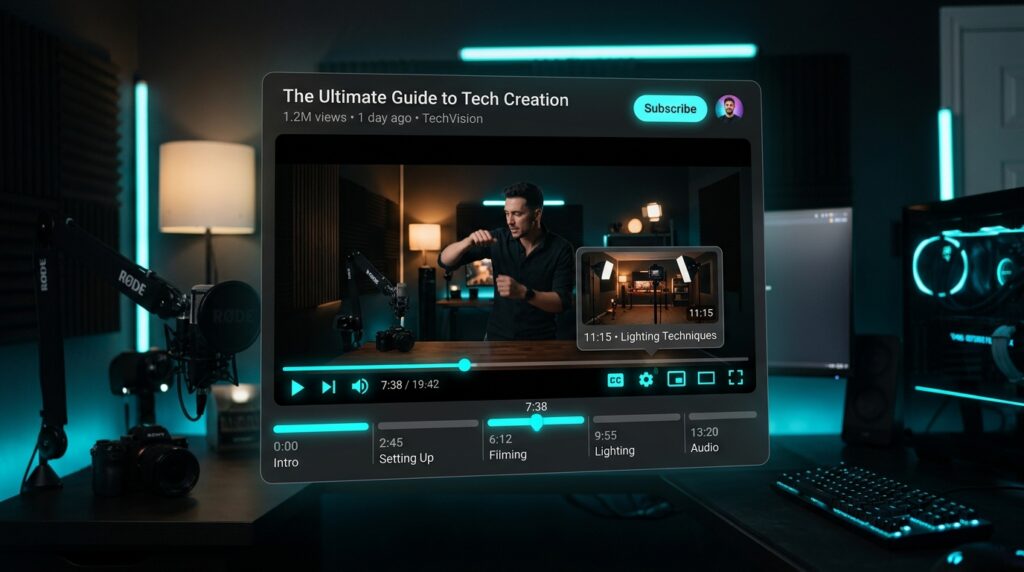
To ensure 100% parsing success on both mobile apps and desktop browsers, memorize these four structural mandates:
- The Absolute Zero Anchor: The very first timestamp listed in your description must begin at exactly
00:00or0:00. A common beginner error is starting the list at the end of the intro (e.g.,01:15 - First Tip). If the zero timestamp is missing, the entire chaptering engine remains deactivated. - The Triad Minimum: You must provide a minimum of three timestamped entries. Two timestamps will merely function as clickable hyperlinked shortcuts; they will not fracture the red progress scrubber into distinct physical blocks.
- The 10-Second Distance Rule: Each chapter must span at least 10 seconds of playback time before the next timestamp begins. Attempting to create 4-second micro-chapters results in the parser skipping intermediate entries.
- Strict Ascending Chronological Order: Timestamps must proceed chronologically from earliest to latest. Reversing the order or inserting an earlier timestamp lower down will break parser execution.
00:00 - Introduction & Problem Overview
01:45 - Essential Hardware Requirements
04:20 - Step-by-Step Software Configuration
07:55 - Troubleshooting Common Audio Lag
11:10 - Final Export & Quality Verification
13:40 - Summary & Recommended Next Steps
Pro Tip: Always separate the timestamp digits from the chapter label using a clean space-hyphen-space sequence ( - ). While colons or brackets sometimes parse, the space-hyphen format is guaranteed to work across all YouTube client API builds.
2. The SEO Powerhouse: Unlocking Google “Key Moments” Rich Snippets
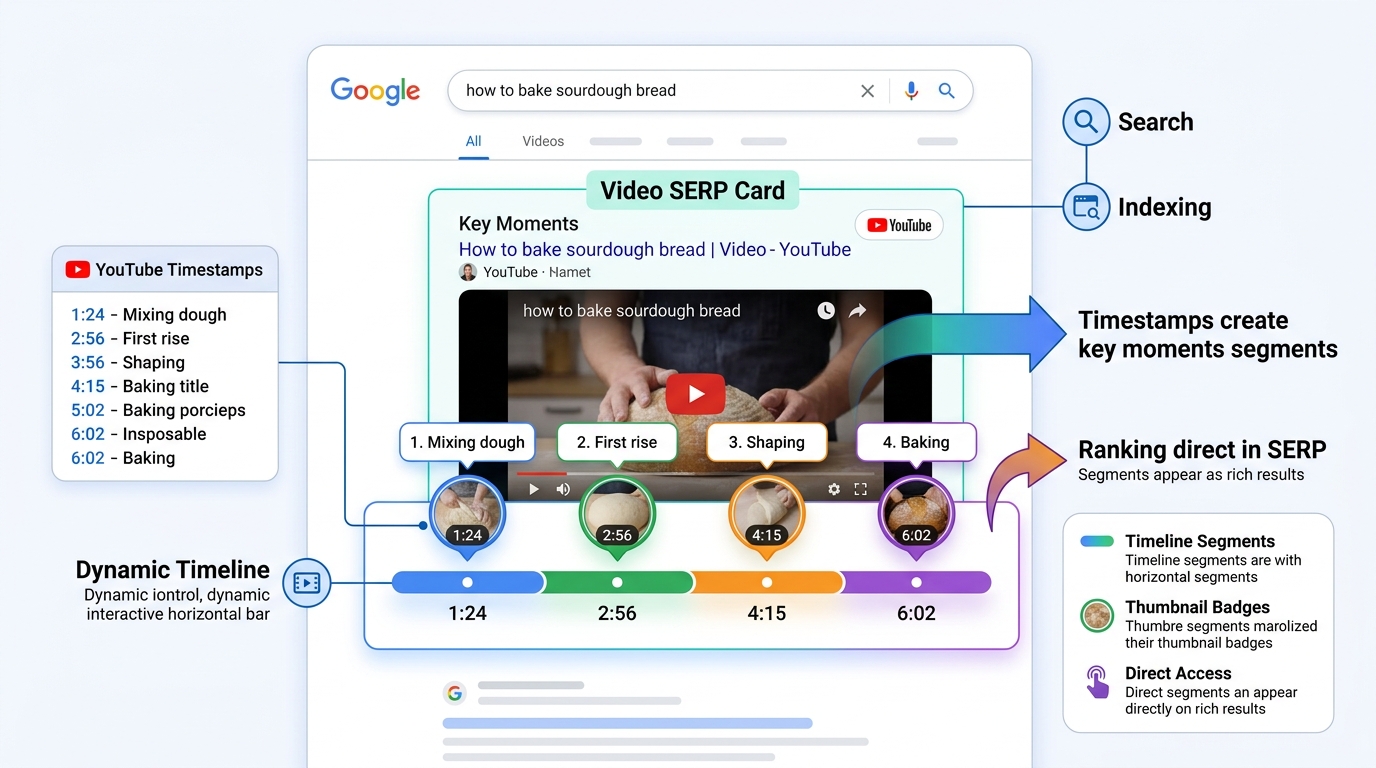
The single greatest commercial advantage of adding chapters to your YouTube videos is not player aesthetics—it is search engine domination. When Google processes a query with informational intent (for example, “how to fix audio crackling in OBS”), its search algorithm actively seeks structured video chapters to answer the user’s specific question.
Instead of displaying a standard blue headline link, Google renders a large, prominent Key Moments SERP Card. This interactive rich snippet displays your video thumbnail alongside an expandable carousel of timestamped chapter segments. When a searcher clicks on a specific segment (such as “07:55 – Troubleshooting Common Audio Lag”), Google launches YouTube and immediately begins playback at the exact millisecond where that solution begins!
This provides an astronomical SEO benefit: a single 15-minute tutorial can occupy the number-one search position for ten completely different long-tail search queries simultaneously, funneling high-intent search traffic into your video months and years after publication.
3. Keyword Optimization for Chapter Labels (The Entity-First Approach)
Many creators waste the SEO potential of chapters by using lazy, generic labels like “Tip 1,” “Part 2,” “Next Step,” or “My Thoughts.” Google’s natural language processing (NLP) algorithms cannot match user search queries against meaningless placeholder words.
To maximize search indexing, treat every chapter title as a micro-headline engineered with specific semantic keywords:
- Bad Generic Label:
03:15 - Settings - Optimized Semantic Label:
03:15 - Best OBS Rate Control Settings (CQP vs CBR) - Bad Generic Label:
06:40 - Audio Setup - Optimized Semantic Label:
06:40 - How to Configure Multi-Track Audio Recording - Bad Generic Label:
09:20 - Fixing Bugs - Optimized Semantic Label:
09:20 - How to Fix OBS Dropped Frames & Rendering Lag
When you incorporate natural problem-solution keywords into your chapter labels, you align directly with the natural search strings typed into both Google and YouTube search bars.
4. Manual Timestamps vs. Automatic Chapters: Why Manual Wins Every Time
Inside YouTube Studio, YouTube provides an automated feature called “Automatic chapters (when available and eligible).” While this artificial intelligence tool scans speech recognition transcripts to generate chapter breaks on its own, relying on automated chapters is dangerous for serious creators.
| Operational Factor | Manual Creator Timestamps | YouTube Automated AI Chapters |
|---|---|---|
| Keyword Accuracy | 100% targeted to high-volume SEO search terms | Generic phrases extracted from raw spoken transcript |
| Segment Precision | Exact frame cuts aligned with visual transitions | Imprecise cuts often starting mid-sentence |
| Control & Branding | Total editorial control over chapter names and pacing | Algorithmically assigned without creator review |
| SERP Snippet Reliability | Consistently indexed by Google Key Moments | Often skipped or misclassified by search crawlers |
In YouTube Studio, open your video details, scroll down to the bottom, and click Show more. Under the Automatic chapters section, ensure you uncheck “Allow automatic chapters (when available and eligible).” By placing your own formatted timestamps in the description box, you retain 100% authority over your content structure.
5. Viewer Retention Dynamics: Do Chapters Hurt or Help Watch Time?
A common fear among creators is that adding chapters will encourage viewers to skip ahead, prematurely dragging down Average View Duration (AVD). Comprehensive analytics across millions of viewing hours completely contradict this myth.
When a frustrated viewer arrives at an unchaptered 20-minute video seeking a specific 2-minute solution, scrubbing blindly through an undifferentiated timeline is an aggravating experience. After twenty seconds of futile scrub attempts, the viewer bounces from your video permanently, registering an atrocious 1% retention score.
Conversely, when chapters are present, the viewer immediately identifies the relevant chapter, clicks directly to it, watches the solution attentively for three minutes, and—because their problem was solved efficiently without friction—often stays to explore adjacent chapters or clicks your end screen sequel! Chapters replace frustrated bounces with satisfied, high-retention engagement.
Frequently Asked Questions
The most common reasons are: (1) You forgot to start with 00:00 as your first timestamp; (2) You listed fewer than three timestamps; (3) One or more chapters are shorter than 10 seconds; or (4) Your channel has active Community Guidelines strikes, which temporarily suspends chapter rendering privileges.
No. YouTube Shorts (vertical videos under 60 seconds) do not support interactive progress bar chaptering. Chapters are exclusively supported on standard horizontal long-form video uploads.
While timestamps placed in pinned comments remain clickable as hyperlinks, YouTube’s timeline scrubber engine now exclusively parses timestamps placed directly within the official Video Description box. Always place your master timestamp list in your description.
YouTube supports up to 100 chapters per video. However, for standard 10 to 20-minute tutorials, having between 6 and 12 well-defined chapters provides the ideal balance between granularity and visual cleanliness on mobile scrubbers.
Yes, immensely. Google’s search engine directly converts well-formatted YouTube chapters into “Key Moments” rich search cards, allowing your video to appear at the very top of Google search results for hyper-specific questions answered within individual segments.