
Download, Resize, Preview & Optimize YouTube Thumbnails in 4K/HD
Lossless thumbnail extraction + smart resizer with borders, filters & compression + AI-powered preview & optimization score. 100% free, no signup, no watermarks.
✓ 4K Ultra HD ✓ No tracking ✓ Instant download ✓ Privacy-first ✓ AI optimization score

YouTube Thumbnail Downloader
Grab original, high-fidelity thumbnails in 4K, HD, 1080p directly from YouTube's CDN. Perfect for competitor analysis, design references, and archival.
- ⚡ Lossless retrieval
- 🎯 Maxresdefault & SD options
- 📱 Works on mobile & desktop
Thumbnail Resizer & Optimizer
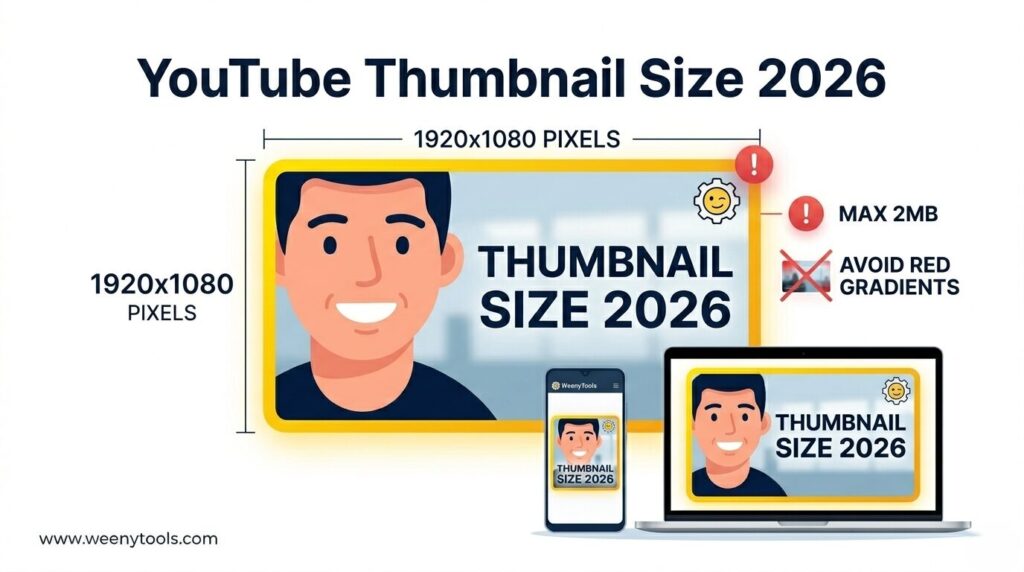
All‑in‑one suite: resize to 1280x720, compress under 2MB, add borders, filters and more. Meet YouTube's exact specs for faster load & higher CTR.
- ✨ Red border / glow effects
- 📐 Aspect ratio correction
- ⚙️ Smart compression & WebP
Thumbnail Preview & Optimization Score
Upload your thumbnail and get an AI-powered optimization score based on resolution, text readability, color contrast, and file size. Preview on mobile, tablet, and desktop.
- 📱 Mobile preview with squint test
- 📐 Resolution & file size analysis
- 🎨 Color contrast & artifact detection
⚙️ Engineering Workflow: From Source to Click‑Winning Thumbnail
Resize & Enhance
Open Resizer & Optimizer, set 1280x720, add borders or filters for psychological impact.
Compress & Export
Ensure file size below 2MB (YouTube best practice). Download and upload to boost CTR.
Why WeenyTools is Trusted by Next‑Gen Creators
Privacy‑First
No registration, no tracking, no data collection. Client‑side processing.
Exact 1280x720 Spec
Auto enforce YouTube's recommended dimensions + 2MB limit.
Psychology‑Driven
Add red borders, reaction face filters, complementary colors for higher CTR.
AI Optimization Score
Get real-time feedback on text readability, contrast, and file size.
Lightning Fast
Optimized CDN & minimal JavaScript — thumbnails in seconds.
| Feature | Downloader | Resizer+Optimizer | Preview+Score |
|---|---|---|---|
| Max Resolution | 4K / maxresdefault | 1280x720 / custom | Any resolution |
| Creative Filters | — | Borders, shadows, blur, contrast | — |
| Compression | Original quality | Under 2MB with WebP | Size analysis only |
| AI Optimization Score | — | — | Text, contrast, resolution, size |
| Privacy | Zero logs, no uploads to server (local processing for resizer & preview) | ||
📱 Try the Thumbnail Preview Tool Right Here
Upload your thumbnail and see how it looks on mobile, tablet, and desktop — plus get your optimization score.
Click or drag to upload your thumbnail
JPG, PNG, WebP · Max 10MB

Meet the Founder: Asad
Lead Software Engineer & Web Architect — With 5+ years in software engineering, Asad built WeenyTools to eliminate guesswork in thumbnail optimization. "I wanted to combine engineering precision with visual psychology. Our tools give creators a technical edge without complexity."
⚡ Every tool is tested for speed, security, and real-world YouTube performance.
📘 Master YouTube Thumbnails: Expert Guides
Frequently Asked Questions
📥 How do I download a 4K YouTube thumbnail?
Simply paste any YouTube video URL into our YouTube Thumbnail Downloader. We automatically fetch the highest quality available (maxresdefault, 4K, HD). No login needed.
🖌️ What does the Resizer & Optimizer tool do?
Our YouTube Thumbnail Resizer resizes images to 1280x720, compresses under 2MB, adds borders (red, black, white), filters, brightness, and shadows — all within your browser.
📊 What is the Thumbnail Preview & Optimization Score?
Our Preview Tool gives you an AI-powered score (0-100) based on resolution, text readability, color contrast, and file size. Preview on mobile, tablet, and desktop before uploading to YouTube.
⚡ Is WeenyTools free and private?
Absolutely. 100% free with no registration. The downloader uses public APIs; the resizer and preview tool process images locally on your device. We never track or store your images.
📱 Can I use these tools on mobile?
Yes, all tools are fully responsive and work on iOS, Android, and tablets. Download thumbnails, resize them, or preview optimization scores directly from your phone browser.