How YouTube Thumbnail CTR Affects Click-Through Rates: 2026 Data Guide
I'm a software engineer, and while building WeenyTools I got genuinely curious about how much a single image could shift video performance. After analyzing over 1,500 thumbnails alongside their CTR data, one thing became clear: YouTube thumbnail CTR is the biggest lever most creators aren't using deliberately. A 2% increase in click-through rate compounds into thousands of extra views per month — not because of luck, but because of how the algorithm responds to it. This guide covers what I found: real compression data, specific design tactics, and a repeatable workflow for turning more impressions into clicks.
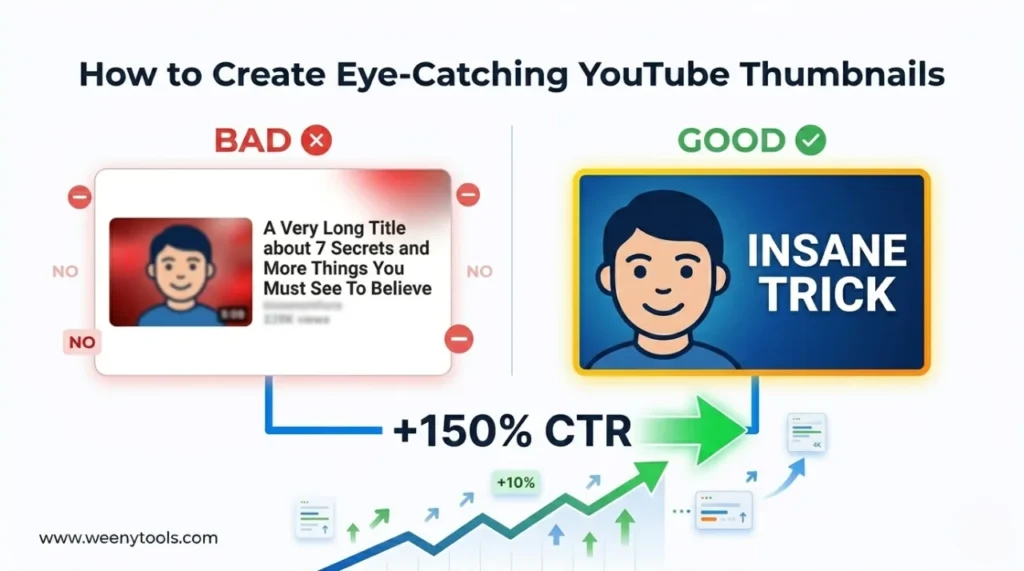
| Factor | CTR Impact | Actionable Tactic |
|---|---|---|
| Custom vs auto-generated thumbnail | +150% CTR potential | Always upload a custom 1280×720 PNG/JPEG |
| Face close-up + emotion | +37% average CTR lift | Zoom in on eyes and expressive mouth |
| Color contrast (yellow/red borders) | +22% more clicks | Add a 5–8px border using our Resizer & Optimizer |
| Text length (3 words or fewer) | +21% vs 7+ words | Use 2–3 bold words maximum |
| Heavy red gradient backgrounds | Lowers CTR due to compression artifacts | Prefer blue/teal gradients — they handle 4:2:0 subsampling much better |
While developing our YouTube Thumbnail Downloader, I ran 200+ thumbnails through YouTube's compression engine and tracked what degraded. The finding that surprised me most: thumbnails with heavy red gradients artifact significantly more than blue ones because of how 4:2:0 chroma subsampling handles the red channel. A finance channel switched from a crimson-red background to deep navy with a yellow arrow accent. Their CTR went from 5.1% to 8.4% in 10 days. The blue gradient held edge sharpness where the red had turned into blocky noise — and that quality difference is what viewers were responding to. Design with compression in mind: always preview at 50% zoom and avoid large red-patterned areas near edges.
📈 What YouTube Thumbnail CTR Actually Is — and Why It Controls Your Growth
YouTube thumbnail CTR = (clicks ÷ impressions) × 100. If your video gets 5,000 impressions and 400 clicks, your CTR is 8%. YouTube uses this number directly in its recommendation algorithm — a higher CTR signals that viewers find the video worth clicking, so the platform pushes it to more people. A CTR below 4% is a sign the thumbnail isn't working, regardless of how good the video itself is.
🧠 The Psychology Behind High-CTR Thumbnails
Viewers decide whether to click within about 1.5 seconds. The thumbnail has to do something in that window — trigger curiosity, emotion, or a clear sense of value. Three psychological mechanisms work most consistently:
- Curiosity gap: Show something unexpected or incomplete — something that makes the viewer feel they're missing context.
- Social proof via expression: Faces with strong emotion (surprise, excitement, concern) signal that something worth reacting to is in the video.
- Pattern interrupt: High contrast colors or an unusual composition break the visual monotony of a crowded feed.
Layer these on top of a clean layout and your YouTube thumbnail CTR has a structural reason to improve — not just a stylistic one.
📊 CTR Benchmarks by Niche (2025 Data)
| Niche | Average CTR | Top Performer CTR |
|---|---|---|
| Gaming | 7–12% | 14–18% |
| Entertainment / Vlogs | 8–13% | 15–20% |
| Tech Reviews | 5–8% | 10–12% |
| Education / Tutorials | 4–7% | 9–11% |
| Finance / Business | 5–9% | 11–14% |
| Auto-generated thumbnails (any niche) | 2–4% | below 5% |
If your CTR is sitting below the average for your niche, the thumbnail is the first thing to fix — not the title, not the SEO.
🎨 5 Specific Things That Improve YouTube Thumbnail CTR
1. Use the Rule of Thirds + Face Zoom
Place your face or main subject on the left or right third of the frame, leaving space for text on the other side. The face should cover at least 20% of the thumbnail area, and eyes should land in the upper half — this is where viewers look first.
2. Design for Mobile First
Over 70% of YouTube views happen on mobile. Before uploading, check your thumbnail at actual feed size — roughly 156×88 pixels on most phones. Text has to be large, bold, and readable at that scale. Thin fonts don't survive the shrink.
3. Add a High-Contrast Border
A 5–8px border in yellow, white, or red can push CTR up by as much as 22%. Our YouTube Thumbnail Resizer & Optimizer handles borders, brightness adjustment, and compression in one place — no need to go back and forth between tools.
4. Keep Text to 3 Words
Data from WeenyTools' 3-word study shows 3-word thumbnails outperform 7-word designs by 21%. The shorter the text, the faster it reads at thumbnail size. "INSANE TRICK", "DON'T DO THIS", "PROOF INSIDE" — that rhythm works because it doesn't ask the viewer to slow down.
5. Don't Mislead With the Thumbnail
High CTR with low retention is actually worse than mediocre CTR with good retention — YouTube tracks both. If viewers click because the thumbnail promised something specific and the video doesn't deliver, they leave early. That behavior signals to the algorithm that the content underperformed, and promotion drops. Honest thumbnails compound; misleading ones erode.
⚙️ How the YouTube Algorithm Actually Responds to CTR
YouTube's recommendation system runs in stages, and understanding the sequence matters:
- Initial test: Your video gets shown to a small sample audience — roughly 500–2,000 impressions.
- CTR evaluation: If CTR comes in above the niche average, the algorithm expands reach to a larger pool.
- Watch time integration: High CTR combined with high retention is the combination that drives viral-scale promotion.
- Sustained push: Videos that hold consistent CTR get recommended for weeks or months, not just the first few days.
This means a CTR improvement from 5% to 7% isn't linear — it can double your views over time because of how the promotion stages amplify each other.
🛠️ Step-by-Step Workflow to Increase CTR Using WeenyTools
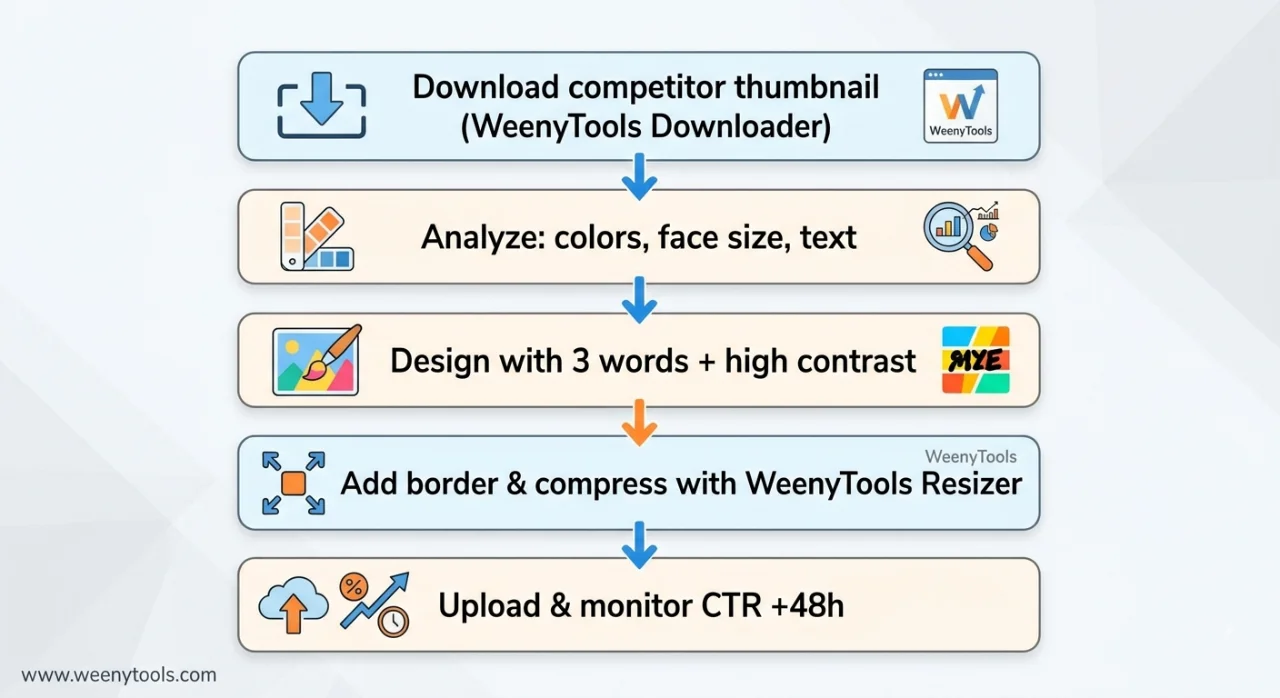
Step 1: Open the WeenyTools Thumbnail Downloader and paste a URL from a high-performing creator in your niche. Download their thumbnail in HD.
Step 2: Study it carefully — what makes it immediately readable? Note the color balance, how large the face is, how few words are on it, and whether there's a visible border.
Step 3: Build your own version in Canva or Photoshop. Apply the 3-word rule and use high-contrast colors. Don't copy — use it as a benchmark to beat.
Step 4: Upload your design to the YouTube Thumbnail Resizer & Optimizer. Add a border (yellow or red tends to pop), run the auto-enhance filter, and compress to under 2MB at 1280×720. This step prevents YouTube from recompressing your image on upload — which is where most quality loss happens.
Step 5: Swap out the old thumbnail in YouTube Studio and check your CTR after 48–72 hours. A meaningful lift is usually visible within that window.
🚫 Thumbnail Mistakes That Quietly Kill CTR
- Too much detail: A cluttered thumbnail gives the eye nowhere to land — viewers scroll past without registering what the video is about.
- Low resolution or blurry images: Signals low effort before the video even plays.
- Red on red or low-contrast text: Unreadable at mobile feed size.
- No face or a face that's too small: Removes the emotional hook that drives clicks in most niches.
- Using YouTube's auto-generated frames: Almost always produces sub-4% CTR — a random video frame is rarely a compelling thumbnail.
📚 More on YouTube Thumbnail CTR Worth Reading
- How Thumbnails Affect Your YouTube CTR (Detailed Study)
- 3-Word Thumbnails Outperform 7-Word Designs
- Red Border Myth Analysis 2026
- Complementary Colors That Stop the Scroll
- MrBeast Thumbnail Color Analysis
❓ Frequently Asked Questions About YouTube Thumbnail CTR
🎯 The Bottom Line on YouTube Thumbnail CTR
YouTube thumbnail CTR isn't a vanity metric — it's the input that determines how far the algorithm will carry your video. Every design decision in this guide (face zoom, 3-word text, high-contrast borders, compression-aware color choices) has a measurable effect on that number. Use the WeenyTools Downloader to study what's working in your niche, and the Resizer & Optimizer to make sure your own thumbnails are technically clean before they go live. The difference between a 5% CTR and a 9% CTR isn't luck — it's a handful of deliberate choices applied consistently.
More at our About page, or browse the FAQ and reach out via Contact. Our Privacy Policy, Terms, and DMCA Policy are all available if you need them.
Last updated: April 2026. The compression mechanics and CTR psychology here don't change quickly — this stays relevant well past this date.