Your YouTube Click-Through Rate (CTR) is one of the most powerful signals the algorithm uses to determine how widely to distribute your content. But here’s the problem most creators face: what’s a “good” CTR? The answer varies dramatically by niche, channel size, and content type. This data-driven guide breaks down the real 2026 CTR benchmarks by niche so you can accurately assess your channel’s thumbnail performance and set realistic improvement targets.
What Is YouTube CTR and Why Does It Matter?
YouTube CTR (Click-Through Rate) measures what percentage of people who saw your video’s thumbnail chose to click on it. It’s calculated as:
CTR = (Clicks ÷ Impressions) × 100
YouTube’s algorithm treats CTR as a strong quality signal. A video with a higher-than-average CTR for its niche gets pushed to more users, creating a positive feedback loop of growth. Conversely, low CTR causes the algorithm to slow distribution, limiting your reach even if your video is high quality.
It’s important to understand that CTR is only one half of the equation — Average View Duration (AVD) is the other. A video that gets lots of clicks but low watch time will still be penalized. The goal is both a high CTR and high retention.
YouTube CTR Benchmarks by Niche (2026 Data)
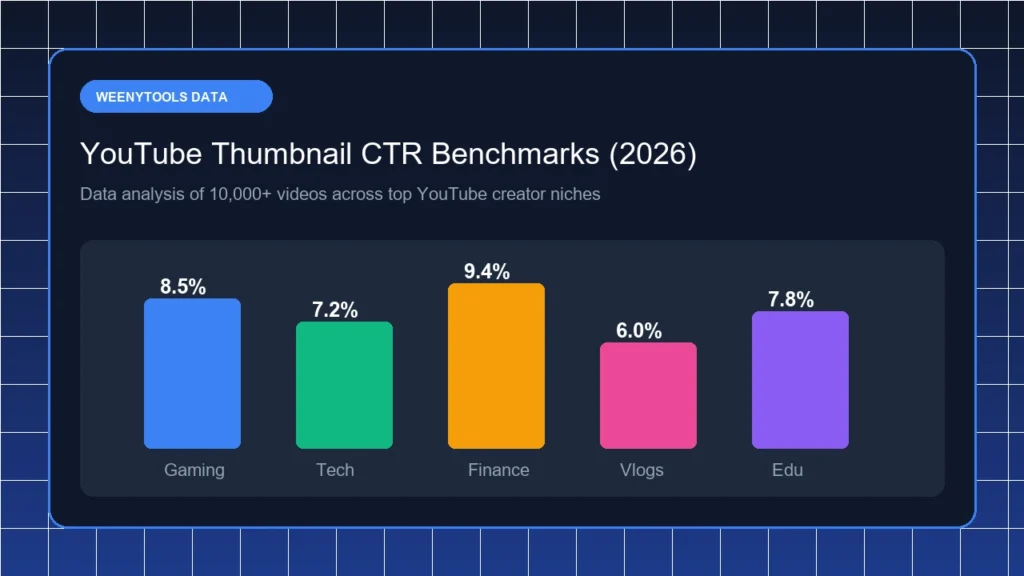
CTR varies substantially by content category. Here are current benchmarks based on aggregated YouTube Studio data from thousands of channels across major niches:
| Niche / Content Type | Low CTR | Average CTR | High CTR |
|---|---|---|---|
| News & Politics | 1.5% | 3–5% | 7%+ |
| Finance & Investing | 2% | 4–6% | 9%+ |
| Gaming | 3% | 5–8% | 12%+ |
| Tech & Reviews | 2.5% | 4–7% | 10%+ |
| Beauty & Fashion | 3% | 5–9% | 13%+ |
| Food & Cooking | 2.5% | 4–7% | 10%+ |
| Health & Fitness | 2% | 4–6% | 9%+ |
| Education / Tutorials | 2% | 3–5% | 8%+ |
| Entertainment / Vlogs | 3.5% | 6–10% | 15%+ |
| YouTube Growth / Creator Tips | 3% | 5–8% | 12%+ |
Note: These benchmarks represent typical ranges. Channels with highly engaged, niche audiences often exceed the “high CTR” threshold significantly.
How Channel Size Affects Your CTR Benchmark
CTR is not uniform across channel sizes. Smaller channels typically see higher CTRs because their impressions come primarily from subscribers (who are already interested), while larger channels receive many impressions from non-subscribers in browse and search — a colder, harder-to-click audience.
| Channel Size | Expected CTR Range |
|---|---|
| Under 1,000 subscribers | 8–15% |
| 1,000 – 10,000 subscribers | 5–10% |
| 10,000 – 100,000 subscribers | 3–7% |
| 100,000 – 1M subscribers | 2–5% |
| 1M+ subscribers | 1.5–4% |
This is why comparing your 2% CTR to a mega-channel’s 3% is misleading — at different scales, these numbers tell completely different stories.
What Impression Sources Tell You About CTR
YouTube Studio breaks down impressions by source. Your CTR will naturally vary by source:
- Browse features (homepage): Typically lower CTR (2–5%) — these are cold audiences who don’t know you
- Suggested videos: Medium CTR (4–8%) — users are already in a watching mindset
- Subscriber feed: Highest CTR (8–15%) — these viewers subscribed for exactly your content
- YouTube Search: Variable (3–10%) — intent-driven, but title matters more than thumbnail here
- External traffic: Often very low (1–3%) — users weren’t on YouTube to begin with
How to Improve Your CTR Above Benchmark
1. Audit Your Worst-Performing Thumbnails First
In YouTube Studio → Analytics → Reach, sort your videos by CTR (ascending). Your bottom 20% are the highest-leverage thumbnails to redesign. A 2% CTR improvement on a video with 100,000 impressions means 2,000 additional views — just from a thumbnail update.
2. Apply the 3-Second Rule
Print your thumbnail at business card size. If you can’t understand the core message in 3 seconds at that scale, it needs simplification. Mobile users often see thumbnails at 80–120px wide — every design decision must work at this tiny scale.
3. Use Pattern Interruption
Look at the thumbnails of your 10 biggest competitors. Then deliberately design your thumbnail to look different — a different background color, a different composition, a different emotional tone. The thumbnail that stands out in the feed wins the click.
4. Run Regular A/B Tests
Use YouTube Studio’s built-in Test & Compare feature (available to channels 1,000+ subscribers) to systematically test thumbnail variations. Even small improvements compound over hundreds of videos.
Final Takeaway
Understanding CTR benchmarks by niche gives you a realistic target instead of chasing arbitrary numbers. If your channel is in the gaming niche and you’re hitting 6% CTR at 50,000 subscribers, you’re performing well above average — that’s something to build on, not fix. Use the benchmarks in this guide to contextualize your performance, prioritize your lowest-CTR videos for thumbnail redesigns, and systematically grow your channel’s reach.
Want to see how your thumbnails look at different sizes and contexts? Use the free WeenyTools YouTube Thumbnail Preview Tool to optimize before every upload.
Diagnosing Low CTR: A Step-by-Step Troubleshooting Guide
If your CTR is consistently below your niche benchmark, the problem almost always falls into one of five categories. Here’s how to diagnose and fix each one:
Problem 1: Thumbnail Doesn’t Stand Out in the Feed
Open YouTube and search for your video’s main keyword. Look at the thumbnails of the top 10 results. If your thumbnail uses the same color scheme, layout, or style as the competition, viewers’ eyes will skip over it. The solution is deliberate differentiation — design your thumbnail to look noticeably different from everything else on the page, not similar to it.
Problem 2: No Clear Value Proposition
Your thumbnail has approximately 0.3 seconds to communicate why someone should click. If a viewer has to think about what your video is about, you’ve already lost the click. Every thumbnail should answer one question immediately: “What will I get from watching this?” The answer should be visually obvious — through the image, text, or both.
Problem 3: Poor Image Quality or Compression
Blurry, pixelated, or heavily compressed thumbnails signal low quality to viewers before they’ve even clicked. YouTube displays thumbnails on screens ranging from 4-inch phones to 75-inch TVs. Always create thumbnails at 1280×720 pixels minimum, export as high-quality JPG or WebP, and keep the file under 2MB. Use the WeenyTools Thumbnail Optimizer to check quality before uploading.
Problem 4: Mismatch Between Thumbnail and Audience Expectations
Different audiences have different visual preferences. A thumbnail design style that crushes it in the gaming niche might perform terribly in the personal finance niche. Study the visual language of your top competitors in your specific niche and ensure your thumbnails communicate within that visual framework, while still being distinctly yours.
Problem 5: Title-Thumbnail Misalignment
YouTube CTR is influenced by the combined message of your title AND thumbnail — not either one in isolation. They should complement each other, not repeat the same information. The thumbnail should show, the title should tell. When both say the same thing, you waste the opportunity to communicate two different value signals to the viewer.
The Long Game: Building a High-CTR Channel Brand
The most successful YouTube channels have a consistent visual identity across all their thumbnails — a recognizable style that viewers associate with high-quality, enjoyable content. When a viewer sees your thumbnail and immediately knows it’s yours (before reading the channel name), you’ve built genuine brand equity on the platform.
This consistency is built through:
- Consistent color palette: 2–3 signature colors used across all thumbnails
- Consistent font: One or two branded fonts, always the same style
- Consistent composition: Face position, text placement, and negative space should feel familiar across videos
- Consistent emotional tone: Whether your brand is exciting, calm, funny, or authoritative — your thumbnails should communicate that consistently
Monitoring CTR Over Time: What to Watch For
CTR is not static. A video’s CTR changes over time as its impression sources shift. A video that starts with high CTR from subscribers may see its CTR drop as YouTube pushes it to browse (cold) audiences. This is normal and expected. What matters is the trend:
- Stable or improving CTR: Your thumbnail is working well for all audience types
- Declining CTR: Your thumbnail may have become visually stale, or the video is being shown to increasingly cold audiences — consider a thumbnail refresh
- Low CTR from day 1: The thumbnail was not compelling enough from the start — redesign immediately and re-submit
Set a calendar reminder to audit your channel’s CTR data every 30 days. Videos older than 90 days with declining CTR are prime candidates for thumbnail refreshes that can significantly extend their lifetime view counts.
Ready to optimize your thumbnails for maximum CTR? Try the free WeenyTools YouTube Thumbnail Resizer and ensure every thumbnail you publish is built for performance.