How to Add Chapters to YouTube Videos: Timestamps SEO Guide (2026)
In modern video search, the single most undervalued organic traffic multiplier is the humble video chapter. When properly structured, YouTube Video Chapters transform your single video into dozens of distinct, indexable micro-assets. Instead of competing for just one broad search keyword, each chapter title acts as a dedicated landing page that Google’s core search engine can extract and rank directly on Page 1 through “Key Moments” rich snippets.
Yet thousands of creators either ignore timestamps completely—fearing that letting viewers skip around will damage their watch time—or rely entirely on YouTube’s automated machine-learning chapters, which routinely assign clumsy, generic labels like “Part 1” or “Discussion” that waste precious SEO opportunities. In this definitive 2026 technical guide, we break down the exact syntax rules required to activate chapters, explain how Google indexes Key Moments, compare Manual vs. Automatic chapters, troubleshoot Google Search Console video markup errors, and provide the keyword-rich formatting framework to dominate both YouTube search and Google SERPs.
Key Takeaways: The YouTube Chapters Blueprint
- The Mandatory 00:00 Rule: The first timestamp in your description MUST start at
00:00(or0:00). If your list begins at any other second (e.g.,00:15 Intro), YouTube’s parser will completely ignore the entire list, and chapters will not render on your progress bar. - The Minimum 3-Chapter Mandate: YouTube requires a minimum of 3 sequential timestamps listed in chronological ascending order, with each chapter lasting at least 10 seconds.
- Unlock Google “Key Moments” Rich Snippets: Properly formatted manual chapters allow your video to appear at the very top of Google Search results with expandable timeline scrubbers, letting searchers jump directly to your solution.
- Manual Always Beats Automatic Chapters: While YouTube can auto-generate chapters using speech recognition, manual chapters allow you to inject high-intent, long-tail search keywords directly into your video metadata.
- Chapters Increase (Not Decrease) Watch Time: Empirical retention data proves that chapters reduce viewer bounce rates. When a user can instantly scrub to the specific sub-topic they need, they stay on your video rather than hitting the back button to find a competitor.
- Fixing GSC Video Enhancement Warnings: Adding structured timestamps eliminates “Missing Field: hasPart” and “Clip Specification” errors in Google Search Console’s Video indexing report.
How YouTube Video Chapters Drive Organic Search Traffic
To understand the immense SEO power of video chapters, you must look at how search engines crawl digital video files. Unlike HTML web pages filled with text paragraphs that Googlebot can easily parse, video files are opaque binary streams.
When you add timestamps to your YouTube description, you are handing Google’s search crawlers a structured schema markup table. Google maps your timestamps directly to its Key Moments index. When a user on Google searches for a specific technical troubleshooting query—such as “how to fix obs audio desync”—Google does not merely suggest a 20-minute video; it highlights the exact 90-second chapter within your video where the solution is demonstrated, embedding a direct video preview directly onto Google Page 1.
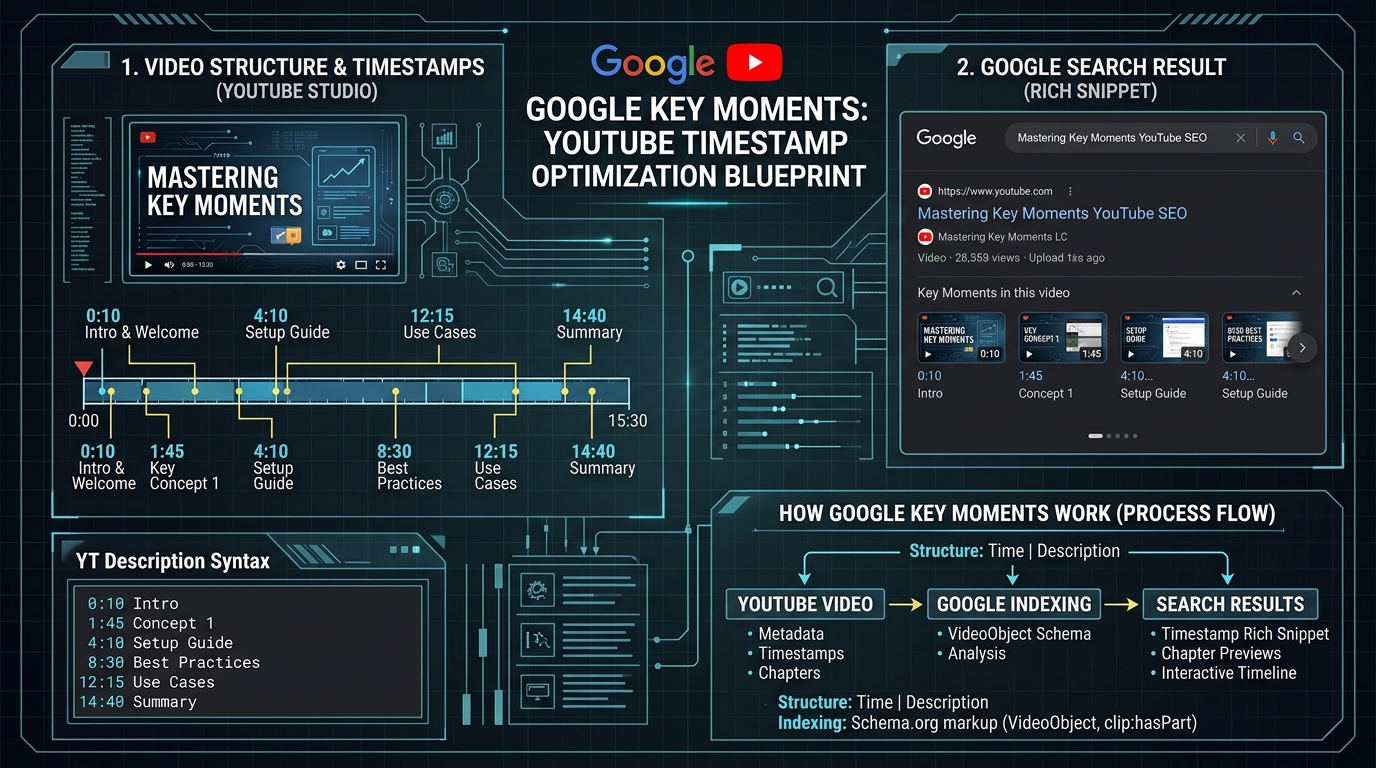
The 4 Golden Syntax Rules for YouTube Chapters
YouTube’s automated description parser evaluates your video description text against strict syntactic rules. If you violate even one of these rules, the player will fail to segment your timeline scrubber:
Rule 1: Always Begin at 00:00
Your timestamp list must contain a line that begins at the very first millisecond of playback: 00:00 (or 0:00). Common mistakes include starting the list at 00:05 or 00:10 after a logo sting. If 00:00 is missing, chapter functionality is 100% disabled.
Rule 2: Minimum of 3 Chronological Chapters
You cannot have only two chapters. You must list at least three distinct timestamps, and they must be arranged in strict chronological order from earliest to latest.
Rule 3: Minimum 10 Seconds per Segment
Every chapter segment must be at least 10 seconds long. If you place a chapter at 01:20 and the next at 01:25, the parser flags the segment as too short and disables chapter marks across the entire timeline.
Rule 4: Exact Separator Spacing
Place a space between the timestamp and the title. Accepted formats include:
00:00 - Introduction to Audio Interfaces00:00 Introduction to Audio Interfaces00:00: Intro to Audio Interfaces
Do not run the words directly against the numbers (e.g., 00:00Intro will fail).
Manual Chapters vs. Automatic Chapters: Which Wins?
In your YouTube Studio upload settings, YouTube offers a checkbox titled “Allow automatic chapters (when available and eligible)”. While automatic chapters save five minutes of typing, relying on them is a severe strategic mistake for serious creators:
| Feature / Capability | Manual Chapters (Creator Authored) | Automatic Chapters (YouTube AI) |
|---|---|---|
| SEO Keyword Control | 100% Precision (Target high-volume search queries) | Zero (Generic AI speech transcription summaries) |
| Google Key Moments Ranking | Dominant (Optimized for exact search intent) | Moderate (Often misses conversational nuances) |
| Segment Boundary Accuracy | Frame-accurate to the exact sentence start | Clumsy (Often cuts mid-sentence or mid-joke) |
| Reliability & Availability | Instant (Active the millisecond video publishes) | Delayed (Can take 48+ hours or fail entirely) |
The High-Converting Chapter Naming Framework
Do not waste your chapter titles on passive, boring phrases like “Step 1”, “Overview”, or “Thoughts”. Instead, write each chapter title as if it were a high-ranking blog post headline:
1. Use Action-Oriented Verbs
Instead of “03:15 Focusrite Scarlett”, write “03:15 How to Calibrate Focusrite Scarlett Gain Knob”. Action verbs match real search queries.
2. Front-Load the High-Intent Keyword
Keep the most important search term in the first 3 words of the chapter title so it remains fully visible on mobile scrubbers without truncation.
3. Real-World Description Template:
TIMESTAMPS:
00:00 - The OBS Audio Desync Problem Explained
01:14 - Why Variable Frame Rate (VFR) Ruins DaVinci Resolve
03:22 - Step 1: Force Constant Frame Rate (CFR) in OBS Settings
05:45 - Step 2: Auto-Remux MKV to MP4 in OBS Studio
08:10 - Step 3: Project Frame Rate Alignment in DaVinci Resolve
11:30 - Testing Audio Sync Across 60-Minute Recordings
13:15 - Final Recommendations & Best Audio Interfaces
Advanced Chapter Optimization for Google Search Console (GSC)
When you monitor your channel’s performance in Google Search Console under the Enhancements > Videos report, you will frequently encounter warnings related to structured video schema. Implementing accurate manual chapters directly resolves these errors:
1. Eliminating “Missing Field: hasPart” Warnings
Google’s structured data guidelines recommend defining discrete clip boundaries within long-form educational videos. By embedding timestamps in your YouTube description, YouTube’s automated Schema generator populates the hasPart JSON-LD array with Clip objects containing name, startOffset, and url parameters. This transforms your video into a fully compliant semantic entity in Google’s Knowledge Graph.
2. Capturing Competitor Search Volume
If a competitor created a popular 40-minute video comparing five microphones, but neglected to add chapters, Google Search has difficulty isolating their specific comparison of the second microphone. By creating a dedicated chapter titled “Shure SM7B vs Rode PodMic Shootout”, Google will frequently rank your specific chapter above your competitor’s entire 40-minute video when users search for that specific comparison.
Formatting Chapters for Podcasts, Music & Multi-Hour Live Streams
Different video formats require tailored timestamp structuring to maximize audience utility and engagement metrics:
1. Long-Form Video Podcasts (1 to 3 Hours)
For podcasts exceeding 60 minutes, use the HH:MM:SS format (e.g., 01:14:22 Deep Dive into AI Neural Networks). Frame every chapter around the guest’s specific story, controversial opinion, or core insight rather than generic topic names.
2. Multi-Track Music & DJ Mixes
If you upload music sets, include the track artist, song title, and record label in the timestamp line: 00:00 Artist Name - Track Title (Original Mix) [Label]. YouTube’s Content ID system cross-references these timestamps to provide accurate licensing attribution and automated revenue sharing.
3. Live Stream VODs
Live streams frequently suffer from slow, unedited starts (e.g., 10 minutes of “Stream starting soon” splash screens). Adding manual chapters immediately after the broadcast concludes allows on-demand viewers to skip past pre-stream setup directly to the live event kickoff, salvaging your VOD retention curve.
Frequently Asked Questions (FAQ)
Do chapters hurt my Average View Duration (AVD)?
No! Extensive retention analytics show that chapters actually improve overall channel watch time. Without chapters, a viewer who only needs one specific tip will scrub aimlessly for 15 seconds, get frustrated, and click away to another creator (resulting in a 15-second bounce). With chapters, that viewer jumps directly to the answer, watches that 3-minute segment completely, and often clicks another video on your end screen.
Why are my chapters not showing up on my video?
If your chapters fail to appear, verify these four troubleshooting checks:
- Did you include
00:00as the very first timestamp? - Do you have at least 3 chapters listed?
- Are all chapters at least 10 seconds apart?
- Does your channel have any active Community Guidelines strikes? (YouTube temporarily disables chapter parsing on channels with active strikes).
Can I add chapters to YouTube videos after they are published?
Yes. You can edit your description in YouTube Studio at any time to add, modify, or re-title chapters. Once you click Save, YouTube’s player re-indexes the description within 5 to 15 minutes, updating the scrubber bar and search snippets globally.
Do chapters work on videos over 1 hour long?
Yes. For long-form videos exceeding 60 minutes (such as podcasts, conference keynotes, or multi-hour streams), use the three-part timestamp format: HH:MM:SS (e.g., 01:24:15 Deep Dive into GPU Architecture). YouTube seamlessly parses hours, minutes, and seconds.
Can I disable automatic chapters if YouTube creates bad ones?
Yes. In YouTube Studio, open the video details, scroll down to Show More, locate the Automatic Chapters section, and uncheck the box labeled “Allow automatic chapters (when available and eligible)”. Once unchecked, YouTube will prioritize your manual description timestamps exclusively.