YouTube End Screen Click-Through Rate: Best Layouts & Timing (2026)
In the high-stakes game of YouTube algorithmic growth, most creators obsess over their initial Click-Through Rate (CTR) and first-30-second retention. Yet the single most potent lever for turning a modest upload into a recurring traffic engine sits at the very end of your timeline: the YouTube End Screen. When a viewer reaches the final 20 seconds of your video, they have proven that they love your pacing, respect your authority, and find your content deeply engaging. They are at the exact peak of audience trust.
Yet on 90% of YouTube channels, the end screen is an unmitigated disaster. The creator delivers an obvious “outro cue”—saying “Well guys, that wraps up today’s video…” or fading to an awkward static title card—causing 85% of remaining viewers to close the tab or scroll to another channel before the end cards even render. An average End Screen CTR hovers around a disappointing 1.5% to 3%. But top-tier creators who master the “Verbal Bridge” framework routinely achieve 12% to 18% End Screen CTRs, chaining thousands of consecutive views into an unbroken binge-session. In this comprehensive guide, we dissect the exact layout templates, timing rules, and scripting psychology required to master the YouTube End Screen in 2026.
Key Takeaways: The End Screen Optimization Blueprint
- Session Time is Algorithmic King: When a viewer clicks an End Screen card and watches another video on your channel, YouTube’s algorithm registers a successful “Viewer Session Extension”. YouTube heavily rewards channels that keep viewers on the platform, triggering massive recommendation boosts across Suggested and Browse feeds.
- Kill the “Outro Cue” Forever: Never say “In conclusion”, “Thank you for watching”, or “That’s all for today”. The moment viewers hear an exit cue, they leave. Transition directly from your final insight into the next recommended video.
- The “Verbal Bridge” Technique: Script your final sentence as an irresistible teaser that frames your next video as the mandatory, immediate next step in the viewer’s learning journey.
- Duration Matters (7 to 10 Seconds Max): While YouTube permits up to 20 seconds for end screens, 20 seconds is far too long and causes visual boredom. The optimal end screen window is 7 to 10 seconds.
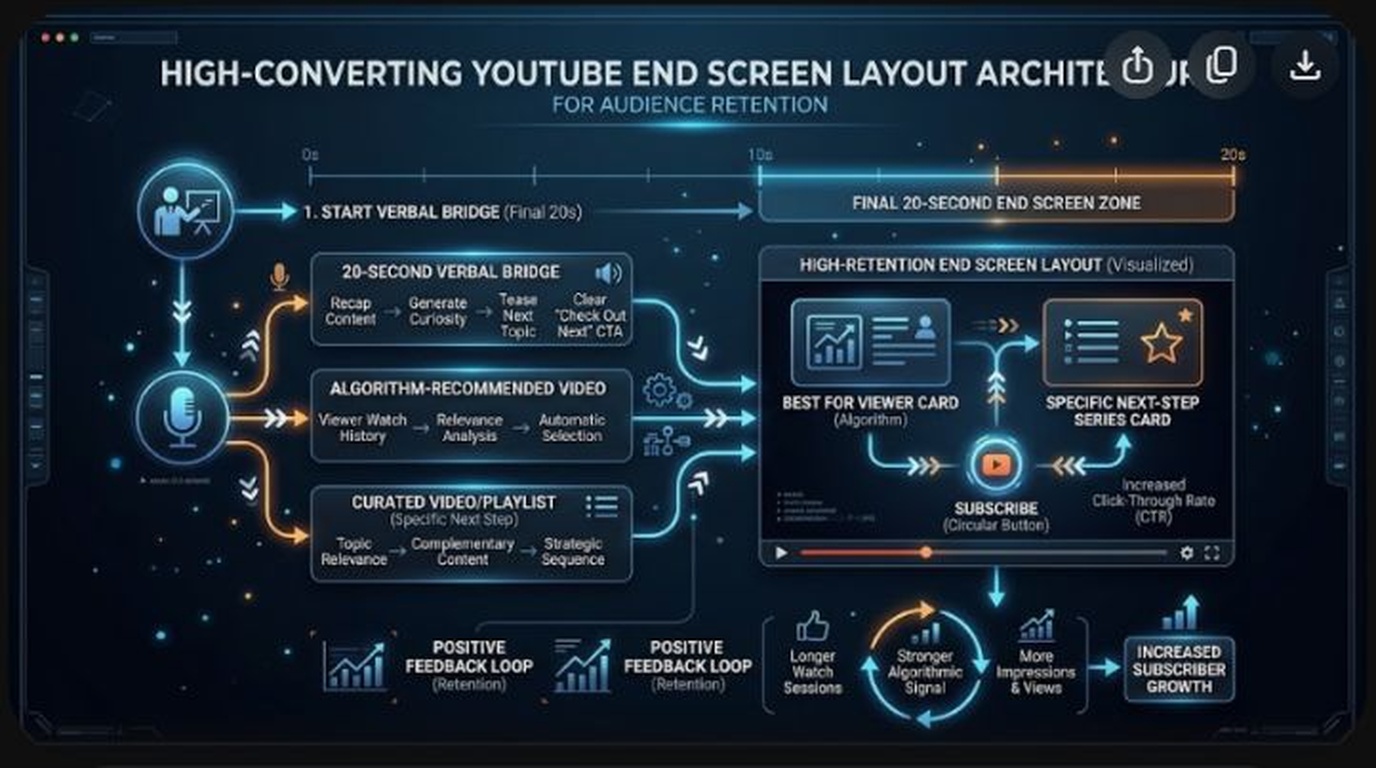
- The Best Layout Architecture: Deploy a maximum of two interactive elements: one targeted “Specific Video” card paired with your circular channel “Subscribe” button (or one Specific Video + one Best for Viewer card). Too many choices trigger decision paralysis.
The Psychology of Viewer Session Time
To understand why End Screen CTR is so critical, you must examine how YouTube measures channel authority. Many beginner creators assume YouTube only evaluates individual videos in silos. In reality, YouTube’s primary business goal is maximizing Total Platform Session Time.
If a viewer watches your 10-minute video, reaches the end, and closes YouTube to go check their email, that session has ended. But if that same viewer clicks an End Screen card, watches a second 8-minute video on your channel, and then clicks a third video, your channel just generated 26 continuous minutes of platform session time.
YouTube’s recommendation algorithms actively track this multi-video chain through a metric known internally as Session Starts and Session Extensions. When a video consistently drives viewers into a subsequent watch session via End Screens, YouTube flags that video as an “Anchor Asset” and aggressively promotes it to new, cold viewers on the Home feed.
The Fatal Mistake: The “Outro Cue”
Look at your Audience Retention graph in YouTube Studio. On almost every video, the retention curve features a sharp, cliff-like drop in the final 15 to 20 seconds. This drop-off is almost always self-inflicted by the creator through Outro Cues.
An Outro Cue is any verbal, musical, or visual signal that informs the viewer the content is over:
- “Well guys, that’s going to do it for today’s video…” (Verbal Cue)
- “If you enjoyed this tutorial, make sure to hit like and subscribe…” (Housekeeping Cue)
- Fading to a black screen, showing credits, or dramatically changing the background music to an upbeat outro track (Sensory Cue)
The human brain is an efficiency machine. The millisecond a viewer realizes you are no longer delivering new insights, their dopamine drops, and their thumb instinctively swipes away to find the next video. If your end screen cards only appear after you start your outro speech, you are pitching to an empty room.
The “Verbal Bridge” Framework: How to Script the Final 15 Seconds
The solution to outro drop-off is the Verbal Bridge. Instead of summarizing what you just discussed, you treat your current video as Act 1 of a larger two-part story, positioning your next video as the urgent, indispensable Act 2.
The 3-Step Verbal Bridge Script Formula:
- Deliver the Final Value Nugget (0:15 before end): Deliver your last critical insight cleanly without slowing down your cadence.
- Identify the Next Unsolved Problem (0:10 before end): Present the logical next obstacle the viewer will encounter now that they’ve solved the first problem.
- The Direct Visual CTA (0:05 before end): Point directly to the video card popping up on the screen and instruct them to click it immediately.
Real-World Verbal Bridge Example:
“Now that your microphone gain is calibrated properly in Windows 11, there is still one major bottleneck: if you don’t configure your OBS audio filters in the exact right order, your voice will still sound hollow and noisy. Click the video on screen right now, where I show you the exact 5-filter chain that professional podcasters use to get broadcast-quality audio.”
Notice what happened: there was no “goodbye”, no “thanks for watching”, and no outro music. The viewer’s natural curiosity was immediately transferred to the next video, driving End Screen CTR through the roof.
Best End Screen Layout Templates in 2026
YouTube allows you to place up to 4 elements on an end screen (Video, Playlist, Subscribe, Link). However, placing 4 elements creates severe visual clutter and triggers Hick’s Law (the more choices presented, the less likely a user is to take action).
| Layout Template | Element Breakdown | Average CTR Performance | Best Use Case |
|---|---|---|---|
| The “Power Pointer” (1 Video) | 1 Specific Video Card (Large Right Side) | 12% – 18% (Highest) | Best overall. Paired with a strong Verbal Bridge pointing to the card. |
| The “Creator Standard” | 1 Specific Video + 1 Subscribe Button | 8% – 12% | Great for growing channels wanting both subscriptions and session time. |
| The “Curated Binge” | 1 Specific Video + 1 Series Playlist | 7% – 10% | Multi-part educational masterclasses or episodic gaming series. |
| The “Cluttered Grid” (4 Elements) | 2 Videos + 1 Playlist + 1 Subscribe | 1.5% – 3% (Lowest) | Avoid completely. Overwhelms mobile viewports and blocks content. |
Mobile Viewport Placement: Avoiding Safe-Zone Traps
Over 75% of your viewers will watch your video on a mobile smartphone. On mobile devices, YouTube overlays essential UI controls on the video player:
- The Bottom 15% Zone: The player scrubber bar, timestamp counter, and quality settings occupy the bottom edge. Never place end screen cards in the bottom fifth of the frame.
- The Top Left Zone: The video title, channel avatar, and back arrow overlay the top-left corner. Placing cards here can lead to accidental miss-clicks or obstructed text.
- The Sweet Spot: Center-right and center-left positions in the middle third of the 16:9 frame provide optimal thumb-reachability on smartphones while avoiding player UI clashes.
Frequently Asked Questions (FAQ)
Should I choose “Best for Viewer” or “Choose a Specific Video”?
Always choose “Choose a Specific Video” whenever you can verbally bridge to a logical next step. While “Best for Viewer” leverages YouTube’s personalized AI recommendation, viewers are 3x more likely to click when you explicitly tell them why they need to watch that specific next video. Use “Best for Viewer” only on standalone, unrelated videos where no direct thematic sequel exists.
How long should my end screen be?
The optimal end screen length is 7 to 10 seconds. YouTube allows up to 20 seconds, but 20 seconds of lingering end cards feels dragging and causes remaining viewers to abandon the player before clicking. A tight 8-second verbal bridge creates urgency and maximizes click conversion.
What is a good End Screen CTR in YouTube Studio?
In YouTube Studio Analytics > Audience > End Screen element performance:
- 1% to 3%: Below average. Indicates early outro cues or cluttered layouts.
- 5% to 8%: Healthy industry standard.
- 10% to 15%+: Elite tier. Proof of a flawless Verbal Bridge and high session engagement.
Can I add an End Screen to YouTube Shorts?
No. YouTube does not support standard interactive End Screen cards on vertical Shorts. Instead, Shorts use the “Related Video” link feature in YouTube Studio, allowing you to link any Short directly to a long-form anchor video on your channel with a permanent clickable pill button above the title.
Do End Screen clicks help me get into the YouTube Partner Program (YPP)?
Yes! Every minute watched by a viewer after clicking your End Screen counts 100% toward the 4,000 public watch hours threshold. More importantly, it trains YouTube’s recommendation algorithm to promote your channel to higher-retention viewers, accelerating organic subscriber growth.