32-Bit Float Audio for YouTube Creators: Complete Setup & Editing Guide (2026)
For more than half a century, the golden rule of audio engineering on film sets, run-and-gun documentary shoots, and YouTube vlogs has been obsessive gain staging. Set your input gain too low, and your whisper is swallowed by analog preamp hiss when boosted in post-production. Set your gain two decibels too high, and an unexpected burst of laughter, a passing siren, or an excited shout instantly drives the analog-to-digital converter into brickwall clipping—permanently shearing off the waveform peaks into harsh, unrecoverable square-wave distortion. Entire production days and irreplaceable real-world moments have been ruined by clipped audio.
The widespread adoption of 32-bit float audio recording has fundamentally eliminated this trade-off. Once reserved for high-end Hollywood field recorders like Sound Devices and Zaxcom, 32-bit float technology is now built directly into accessible creator systems like the Rode Wireless PRO, DJI Mic 2, and Zoom F3. In 2026, setting manual transmitter gain on location is officially obsolete. In this comprehensive technical guide, we break down the binary floating-point mathematics behind 32-bit recording, debunk common industry misconceptions, explain the critical camera-input bottleneck, and demonstrate step-by-step how to recover seemingly “clipped” audio files inside DaVinci Resolve and Adobe Premiere Pro.
Key Takeaways: The 32-Bit Float Creator Protocol
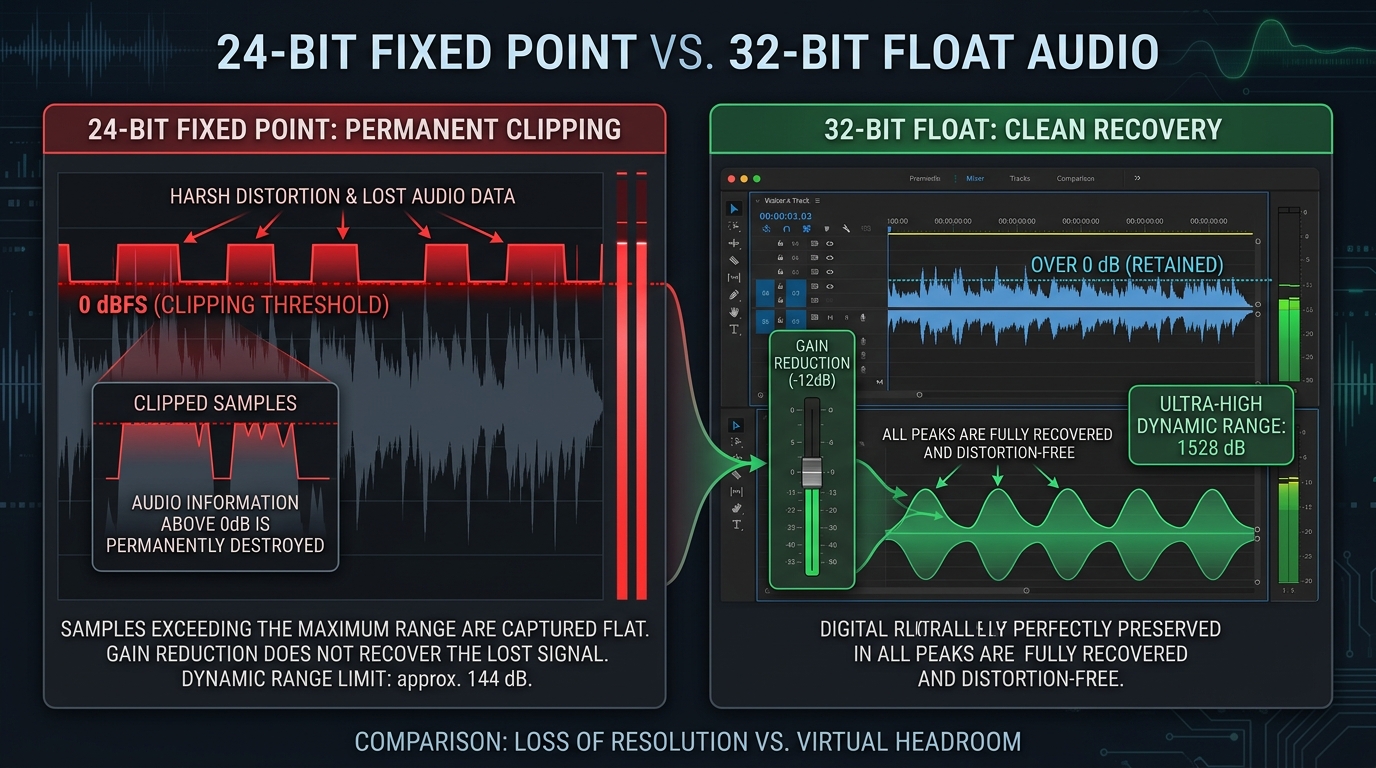
- Mathematical Immunity to Digital Clipping: 32-bit float files offer an astronomical theoretical dynamic range of 1,528 dB (compared to 144 dB for 24-bit fixed point). Signals that peak dozens of decibels above 0 dBFS retain full waveform curvature and can be pulled down cleanly in post-production.
- Dual Analog-to-Digital Converter (Dual-ADC) Architecture: True 32-bit float hardware utilizes two separate ADC chips running in parallel—one tuned for ultra-quiet acoustic signals and one tuned for deafening SPL transients—seamlessly stitching the data into a single 32-bit stream.
- The 3.5mm Camera Cable Bottleneck: 32-bit float is recorded internally to the transmitter’s onboard flash memory. If you transmit wireless audio via a 3.5mm analog cable into your mirrorless camera (Sony, Canon, Fujifilm), the camera’s internal 24-bit/16-bit preamps will still clip. You must sync the onboard 32-bit .WAV files in post.
- Zero On-Location Gain Adjustments: With 32-bit float, you no longer need safety tracks (-6 dB duplicate channels) or physical gain checks before pressing record. Focus on mic placement and acoustic performance; adjust loudness in post.
- Non-Linear Editor (NLE) Support: DaVinci Resolve, Adobe Premiere Pro, Final Cut Pro, and Reaper natively read 32-bit floating point audio without specialized plugins. Pulling down the clip gain slider instantly reveals intact audio peaks.
Fixed Point vs. Floating Point: The Mathematics of 32-Bit Audio
To grasp why 32-bit float audio is mathematically impossible to clip in digital space, one must examine how computers represent electrical amplitude using binary numbers.
16-Bit and 24-Bit Fixed Point: Rigid Ceilings
Traditional digital audio formats utilize fixed-point integer notation. In 24-bit audio, every digital sample is allocated exactly 24 binary bits (1s and 0s) to represent acoustic voltage. This provides 224 possible discrete values (16,777,216 volume steps), yielding an effective dynamic range of 144 decibels.
While 144 dB is broader than the biological limit of human hearing (the threshold of pain sits around 130 dB SPL), fixed-point recording has an unyielding, rigid boundary: 0 dBFS (Decibels Full Scale). In binary, 0 dBFS corresponds to a sample where every single bit is set to maximum value (11111111 11111111 11111111). If an acoustic transient (like a balloon pop or a scream) produces an electrical voltage that exceeds this maximum integer, the converter has no more bits available to represent the wave. It captures the peak as a flat, horizontal line at maximum voltage, destroying the sound wave’s harmonic structure and producing abrasive, jagged digital distortion.
32-Bit Floating Point: Scientific Exponential Notation
32-bit float does not store amplitude as a simple integer. Instead, it utilizes the IEEE 754 floating-point standard, encoding numbers using scientific notation with three distinct components: 1 sign bit, an 8-bit exponent, and a 23-bit mantissa (fractional component).
The mathematical result is staggering: 32-bit float audio can represent a dynamic range exceeding 1,528 decibels. To put this in cosmological perspective: the acoustic difference between the quietest subatomic particle vibration in an anechoic vacuum chamber and the atmospheric shockwave of a massive volcanic eruption is under 300 dB. In 32-bit float, 0 dBFS is no longer an impenetrable concrete ceiling; it is merely an arbitrary nominal reference line.
How Dual-ADC Hardware Prevents Analog Preamp Overload
A common critique from cynical sound engineers when 32-bit float was introduced was: “A 32-bit file format is useless if the analog preamp or microphone capsule physically overloads before the digital converter!”
This critique is 100% correct for single-converter systems. If you simply feed a clipping analog circuit into a 32-bit encoder, you will record a pristine, unclipped 32-bit representation of an already-distorted analog signal. Hardware manufacturers solved this dilemma through Dual Analog-to-Digital Converter (Dual-ADC) architecture.
Inside modern 32-bit float recorders (such as the Zoom F3, Rode Wireless PRO, and DJI Mic 2), the analog signal coming from the microphone capsule is split into two parallel analog paths:
- Low-Gain ADC: Configured with a very low amplification sensitivity. It effortlessly handles explosive sound pressures up to 130+ dB SPL without overloading, but has a higher noise floor during whispers.
- High-Gain ADC: Configured with intense analog amplification. It captures delicate vocal nuances, whispers, and room reverberation with a razor-thin noise floor, but clips during loud shouts.
- Digital Processing Unit (DSP): A microchip constantly monitors incoming samples in real time. During conversational speech and quiet passages, the system writes the high-gain converter’s data. The microsecond an explosive transient occurs, the DSP seamlessly switches to the low-gain converter, encoding the entire event into a single floating-point stream without a single clipped sample or audible artifact.
The 3.5mm Analog Camera Trap (Why Your Footage Still Clips)
The single most widespread misunderstanding among YouTube creators using wireless 32-bit mic systems (like the DJI Mic 2 or Rode Wireless PRO) is assuming that mounting the receiver on their camera hotshoe and running a 3.5mm cable automatically delivers 32-bit audio to their video file.
CRITICAL WARNING: The Camera Input Bottleneck
Mirrorless cameras (Sony A7 IV, Canon R6 II, Panasonic Lumix S5 II, Fujifilm X-T5) only record 16-bit or 24-bit fixed-point audio through their 3.5mm mic inputs. When your wireless receiver sends an analog audio signal down that 3.5mm wire, your camera’s internal analog preamps and 24-bit converter process the sound. If you shout, the audio recorded directly to your camera’s MP4 video file WILL PERMANENTLY CLIP.
The Correct 32-Bit Float Vlogging Workflow:
To benefit from 32-bit float protection, you must use On-Board Transmitter Recording:
- Enable Internal Recording: Configure your wireless transmitter to record internally to its onboard flash storage (32GB of eMMC memory stores over 40 hours of uncompressed 32-bit float .WAV files).
- Use the Camera Audio as a Scratch Track: Keep the 3.5mm receiver cable plugged into your camera. Let the camera record the 24-bit audio as a low-quality “scratch track” for visual waveform reference.
- Sync in Post-Production: In DaVinci Resolve or Premiere Pro, import both the camera video and the internal .WAV file from your transmitter. Highlight both clips, right-click, and select “Auto-Sync Audio by Waveform”. The editor will automatically align the pristine 32-bit internal track to your video, replacing the clipped camera scratch track.
Step-by-Step: Recovering “Clipped” 32-Bit Audio in DaVinci Resolve & Premiere Pro
When you first import a 32-bit float audio file that recorded a loud scream or musical performance into your timeline, the visual waveform may appear flat-topped and red, and playing it back will output harsh clipping distortion through your speakers. Do not panic—this is simply because your monitor output is pegged at 0 dBFS.
Recovering Audio in Blackmagic DaVinci Resolve (Fairlight):
- Drag the 32-bit .WAV file onto an audio track in the Edit or Fairlight timeline.
- Notice that the loud section peaks past the red boundary (+3 dB to +12 dB over 0 dBFS).
- Click on the audio clip and open the Inspector panel in the top-right corner.
- Under the Audio > Volume fader, slowly drag the gain slider down (e.g., reduce by
-10 dBor-15 dB). - Immediately observe the waveform: the flat-topped ceiling disappears, perfectly rounded sine-wave peaks emerge, and the distortion completely vanishes.
- Alternatively, right-click the clip > select Normalize Audio Levels > set Normalization Mode to Sample Peak Program and Target Level to -1.0 dBFS. Resolve will instantly calculate the math and scale the entire file into safe broadcast territory.
Recovering Audio in Adobe Premiere Pro:
- Select the 32-bit audio clip on your timeline or in the Project bin.
- Press the keyboard shortcut
G(or right-click > select Audio Gain…). - Select “Normalize All Peaks To:” and type
-1 dB(or select “Adjust Gain By:” and enter-10 dB). - Click OK. Premiere Pro recalculates the floating-point mantissa, lowering the amplitude and fully restoring the clipped peaks into clean acoustic dialogue.
Hardware Comparison: Top 32-Bit Float Creator Systems (2026)
| System / Model | Form Factor | Onboard Storage | Best Use Case |
|---|---|---|---|
| Rode Wireless PRO | Compact Dual Wireless System | 32GB per TX (40+ hours) | Best all-around YouTube/Vlog kit; includes timecode generator. |
| DJI Mic 2 | Compact Dual Wireless System | 8GB per TX (14 hours) | Direct Bluetooth connection to smartphones; sleek transparent design. |
| Zoom F3 | Pocket Field Recorder (Dual XLR) | MicroSD Card (Up to 1TB) | Best for boom operators, shotgun mics, and professional indie film sets. |
| Zoom M3 MicTrak | On-Camera Shotgun Microphone | MicroSD Card | Solo run-and-gun creators who want a directional mic that never clips. |
Frequently Asked Questions (FAQ)
Do 32-bit float audio files take up significantly more storage space?
A 32-bit float audio file is approximately 33% larger than a standard 24-bit audio file recorded at the same sample rate (48 kHz). Specifically, uncompressed 24-bit/48kHz stereo audio consumes about 16.5 MB per minute, while 32-bit/48kHz stereo audio consumes approximately 22 MB per minute. In an era where 1TB high-speed NVMe SSDs and MicroSD cards cost under $80, this 33% storage increase is completely negligible compared to the insurance against lost recordings.
Can a 32-bit float microphone make a cheap room sound better?
No. 32-bit float technology only protects against digital electrical clipping and quantization distortion; it has zero impact on room acoustics, background reverberation, or traffic noise. If you record in an echoey tile bathroom or next to a buzzing refrigerator, a 32-bit float recorder will simply capture a pristine, unclipped, crystal-clear recording of your bad acoustic environment. Proper microphone placement and room treatment remain mandatory.
Can the microphone capsule itself physically distort before 32-bit float saves it?
Yes. Every physical microphone capsule has an acoustic limit known as the Maximum Sound Pressure Level (Max SPL). This is the volume at which the physical diaphragm bottoms out against its backplate or exceeds its mechanical elasticity. Most high-quality lavalier and shotgun capsules have Max SPL ratings between 120 dB and 135 dB SPL. Unless you place the microphone inside a snare drum or 2 inches from a jet engine, human vocal speech (even screams at 105 dB SPL) will never physically distort the capsule.
Do I need to export my final YouTube video in 32-bit float audio?
No. YouTube’s ingest servers convert uploaded video audio to standard 16-bit or 24-bit AAC / Opus format. You only use 32-bit float during production and timeline editing. Once you have normalized your vocal tracks, applied compression, and ensured your true peaks do not exceed -1.0 dBFS, you can safely export your final YouTube MP4 using standard 48 kHz / 24-bit or 320 kbps AAC audio.
Does 32-bit float audio consume more CPU during timeline playback?
Modern desktop processors (Apple Silicon M-series, Intel Core Ultra, and AMD Ryzen) handle 32-bit floating point calculations natively at the hardware instruction level (SSE/AVX/NEON). In real-world video editing benchmarks across DaVinci Resolve and Premiere Pro, timeline playback of 32-bit float audio files exhibits zero measurable performance penalty or timeline stutter compared to legacy 24-bit files.