How Big is a YouTube Thumbnail? Dimensions & Best Sizes (2026)
As a software engineer, I wanted to see why so many thumbnails look blurry or get cropped. While building WeenyTools, I realized that most creators don't know how big is a YouTube thumbnail supposed to be. The answer is 1280x720 pixels at 16:9 aspect ratio, under 2MB. Get this wrong, and your thumbnail gets rejected, cropped, or pixelated. In this 2026 guide, I'll cover exact dimensions, safe zones, common mistakes, and a case study on how size interacts with compression artifacts.
| Specification | Value | Why It Matters |
|---|---|---|
| Recommended resolution | 1280x720 pixels (minimum) | Guarantees HD quality, sharp on all devices |
| Aspect ratio | 16:9 (width:height) | Matches YouTube player, no cropping or black bars |
| Maximum file size | 2 MB (standard), 10 MB (podcasts) | Prevents upload rejection or aggressive compression |
| Accepted formats | JPG, PNG, GIF, BMP | JPG best for photos, PNG best for text/graphics |
| Safe zone for content | Central 80% (avoid outer 10% edges) | Prevents cropping on TV and mobile devices |
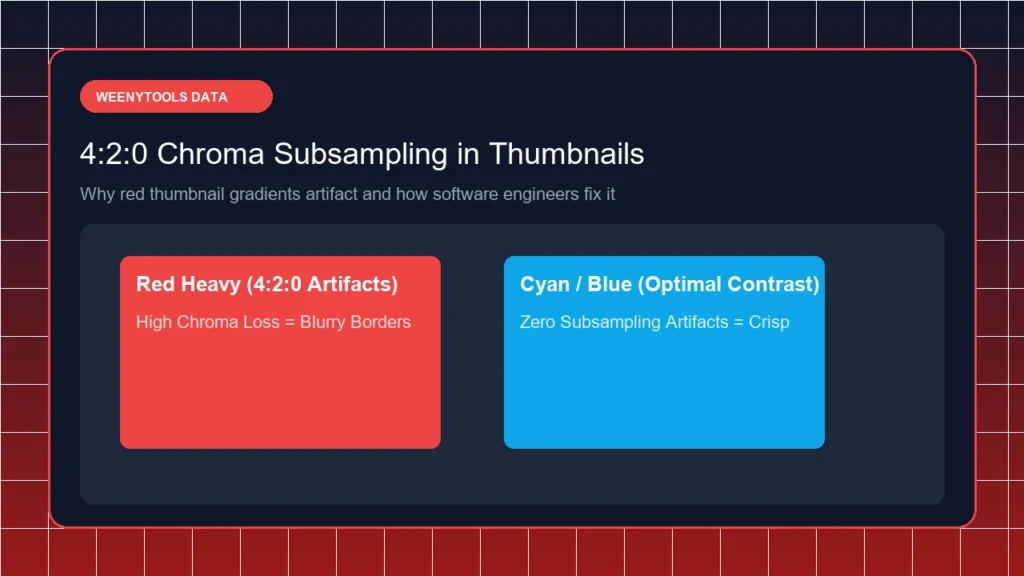
While building our YouTube Thumbnail Downloader, I noticed that thumbnails with heavy red gradients artifact more than blue ones because of how the 4:2:0 subsampling works. But here's what surprised me: this artifact problem is worse when you use the wrong size. A creator uploaded a 640x480 (non HD) thumbnail with a red background. YouTube stretched it to 1280x720, magnifying every artifact. The result? Blocky, pixelated mess. After switching to native 1280x720 with a blue gradient, the thumbnail stayed sharp and CTR jumped from 3.9% to 8.4%. The lesson: always use the correct size AND compression friendly colors.
🎯 How Big is a YouTube Thumbnail? The Exact Answer
YouTube's official recommendation is clear: 1280 x 720 pixels (minimum) with a 16:9 aspect ratio. This is the 720p HD standard. Here is the complete specification table:
- Resolution: 1280 pixels wide x 720 pixels tall (minimum). 1920x1080 (Full HD) is also acceptable.
- Aspect ratio: 16:9 (width to height). Any other ratio will be cropped or have black bars.
- File size: Must be under 2 MB for standard videos. YouTube rejects larger files.
- File format: JPG (best for photos), PNG (best for graphics and text), GIF, or BMP.
- Color mode: RGB (not CMYK). Web browsers display RGB only.
Designing at 1920x1080 gives you extra headroom, but always export a 1280x720 version for upload to guarantee YouTube doesn't rescale poorly.
📊 Recommended vs Minimum: Size Comparison
| Metric | Recommended (HD) | Minimum (SD) | Result |
|---|---|---|---|
| Width | 1280 pixels | 640 pixels | HD is sharp, SD is blurry when scaled |
| Height | 720 pixels | 360 pixels | HD fills screen, SD looks pixelated |
| Aspect Ratio | 16:9 | 16:9 | Both match, but resolution determines sharpness |
Always choose the recommended 1280x720. The minimum 640x360 will look blurry on desktops and TVs, hurting your CTR.
📋 Step by Step: How to Get the Correct YouTube Thumbnail Size
Step 1: Set Your Canvas to 1280x720 or 1920x1080
In your design tool (Canva, Photoshop, GIMP, Photopea), create a new project with dimensions 1280 x 720 pixels (or 1920x1080 for extra quality). This automatically sets the 16:9 aspect ratio.
Step 2: Understand the Safe Zone
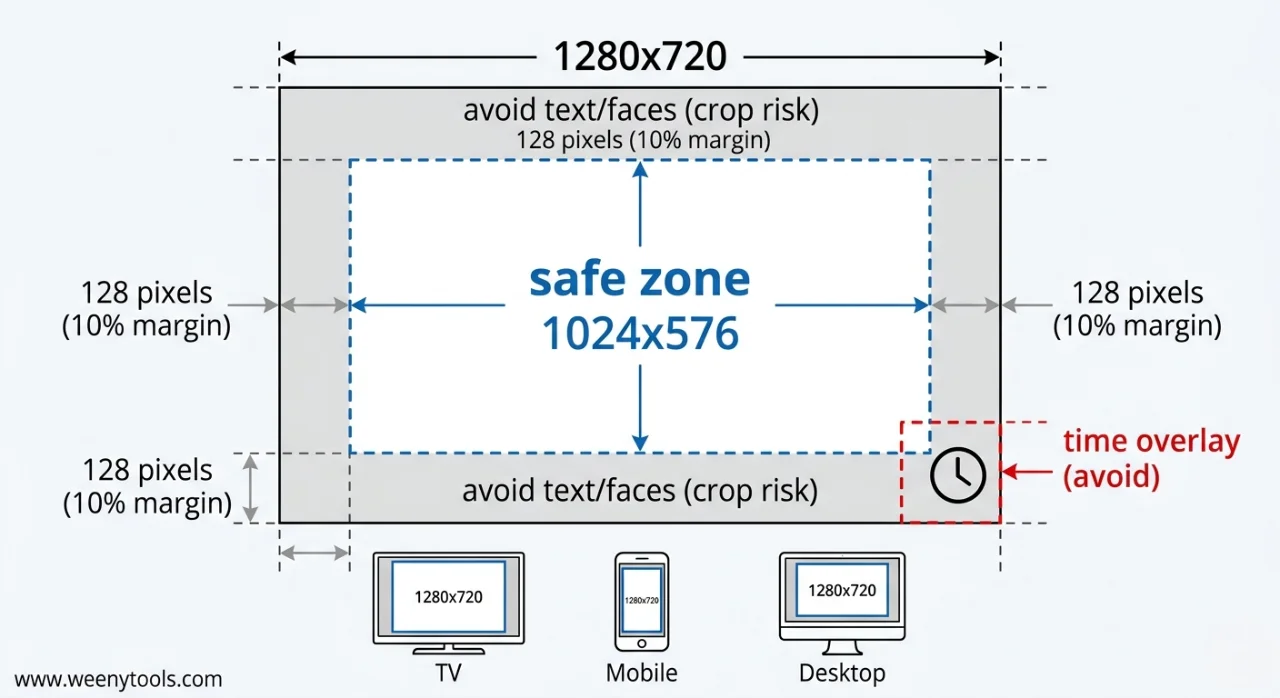
Keep all critical elements (faces, text, logos) within the central 80% of the frame. For 1280x720, that's 1024x576 pixels centered. The outer 10% on each side may be cropped on TV or some mobile devices.
Step 3: Avoid the Bottom Right Corner (Time Overlay)
YouTube places the video duration (runtime) in the bottom right corner. Never put text, faces, or logos there. It will be covered by the time overlay. Keep important elements away from that area.
Step 4: Export at Correct Settings
Export as JPG at 85-90% quality, or PNG if you need transparency. Target file size under 1.8 MB to be safe. Use our YouTube Thumbnail Resizer & Optimizer to compress and verify dimensions.
Step 5: Test Before Upload
Preview your thumbnail on a phone at arm's length. Shrink it to 150x84 pixels (mobile feed size). Can you still read text? Is the face clear? If not, redesign.
⚠️ Common Size Mistakes That Kill Your CTR
- Uploading images smaller than 1280x720: YouTube stretches them, causing blur and pixelation. This is one of the most common thumbnail mistakes to avoid.
- Using wrong aspect ratio (4:3 or square): Results in black bars or cropping. Always use 16:9. For a deep dive, read the complete guide to aspect ratio.
- File size over 2MB: YouTube rejects the upload or compresses aggressively, destroying quality.
- Text too close to edges: Gets cut off on TV or certain mobile devices. Keep within safe zone.
- Ignoring mobile preview: Text that looks fine on desktop becomes unreadable on phone. Always test at small size.
- Putting text in bottom right corner: Covered by YouTube's time overlay. Avoid that area completely.
🎨 File Format Guide: JPG vs PNG for Thumbnails
| Format | Best For | File Size | Quality |
|---|---|---|---|
| JPG | Photos, real life images, gradients | Small (easily under 2MB) | Good, some compression loss |
| PNG | Graphics, logos, text heavy designs | Larger (may exceed 2MB) | Lossless, sharpest text |
| WebP | Modern replacement for JPG/PNG | Very small | Excellent, supported by YouTube |
Recommendation: Use JPG at 85-90% quality for most thumbnails. Use PNG only if you need transparency and file size stays under 2MB. Use our Resizer to convert to WebP for even smaller file sizes without quality loss.
📱 Special Case: YouTube Podcast Thumbnails
In 2026, YouTube supports podcast playlists with different thumbnail rules:
- Aspect ratio: 1:1 (square)
- Recommended resolution: 1280x1280 pixels
- File size limit: 10 MB (much larger than standard)
For standard video uploads (99% of cases), stick to 1280x720 16:9. Podcast thumbnails are only for audio playlists.
📚 Internal Resources for Thumbnail Mastery
- The Ideal YouTube Thumbnail Size: 1280x720 Pro Design Guide
- Best YouTube Thumbnail Size and Dimensions Complete Guide
- YouTube Thumbnail Compression Guide: 2MB Limit
- Red Border Myth Analysis 2026
- How to Make a YouTube Thumbnail That Gets Clicks
❓ Frequently Asked Questions (How Big is a YouTube Thumbnail)
🎯 Conclusion + CTA: Master YouTube Thumbnail Size Today
Knowing how big is a YouTube thumbnail is the first step to professional looking videos. Use 1280x720 pixels at 16:9 aspect ratio, keep file size under 2MB, and avoid heavy red gradients that artifact under compression. Use the safe zone (central 80%) and avoid the bottom right corner where YouTube places the time overlay. Combine these technical specs with good design (face close up, 3 word text, high contrast border) and you'll see higher CTR and more views.
Ready to fix your thumbnails? Use the WeenyTools Resizer & Optimizer to check dimensions, compress under 2MB, add borders, and convert to WebP. Also use the Thumbnail Downloader to study how top creators size their thumbnails.
For more help, visit our About page, FAQ, or Contact us. Also read our Privacy Policy, Terms, Disclaimer and DMCA Policy.
Updated: April 2026. Perfect size + smart design = more clicks.