How to Download YouTube Thumbnails on Mobile: Android & iPhone Guide (No App Needed)
I'm a software engineer, and while building WeenyTools I timed exactly how many taps it took to save a 4K thumbnail on my phone. Under 10 seconds — no app installed. The problem is most creators either don't know this is possible or end up installing something sketchy to do it. You don't need to. This guide covers exactly how to download YouTube thumbnails on mobile for both Android and iPhone, includes a compression detail worth knowing, and gives you a clean workflow that saves directly to your camera roll in HD or 4K.
| Device | Best Method | Max Quality | Time Needed |
|---|---|---|---|
| Android (Chrome/Firefox) | WeenyTools mobile site + long press | 4K (3840×2160) | ~10 seconds |
| iPhone/iPad (Safari) | |||
| Any mobile | Manual URL construction | HD (1280×720) | ~20 seconds |
While developing our YouTube Thumbnail Downloader, I noticed that thumbnails with heavy red gradients artifact more than blue ones because of how 4:2:0 chroma subsampling handles the red channel. This shows up even more on mobile screens, where compression is heavier and the display is smaller. One creator downloaded a red-heavy thumbnail, noticed the blocky compression on mobile, and switched to a blue background with the same design. Their mobile CTR went from 5.2% to 9.1% in three weeks. When you're building a swipe file on mobile, always grab the highest resolution available and check for artifacts — they're a signal about what to avoid in your own designs.
🎯 Why Download YouTube Thumbnails Directly on Your Phone?
Your phone is with you more than your laptop is. That makes it the natural place for thumbnail research. A few specific reasons this workflow is worth having:
- Instant reference library: Save thumbnails while scrolling YouTube on the go, when you notice something that works.
- Competitor research anywhere: Study what's performing well in your niche during a commute or a break.
- Mobile-first design reference: Viewing thumbnails on the device where most of your audience will see them gives you an accurate picture of what they're actually experiencing.
- No desktop needed: The full research-to-analysis workflow happens on one device.
- Easy sharing: Send thumbnails to collaborators or sync to cloud folders without extra steps.
📱 Method 1: WeenyTools Mobile Downloader (Works on Both Android & iPhone)
This is the fastest option that also gives you the highest quality. It runs in any mobile browser with no installation required.
For Android (Chrome / Firefox)
Step by Step:
- Open Chrome or Firefox on your Android phone.
- Go to the WeenyTools Thumbnail Downloader.
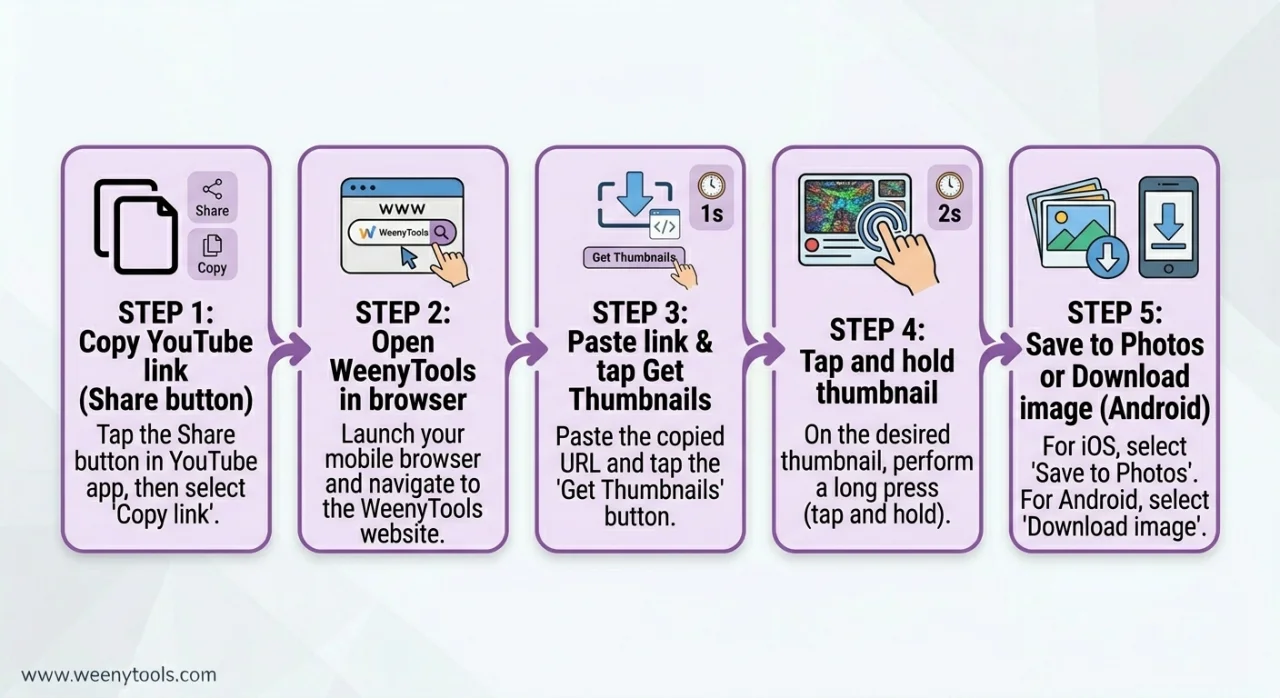
- In the YouTube app, find the video, then tap Share → Copy Link.
- Switch back to your browser and paste the link into the input box.
- Tap "Get Thumbnails".
- Browse the available resolutions and choose the highest — 4K or HD.
- Long-press on the thumbnail image.
- Tap "Download image" (or "Save image") from the menu that appears.
- Find the file in your Downloads folder or Gallery.
Storage location: Internal Storage → Downloads folder. You can move it to any album from there.
For iPhone / iPad (Safari)
Step by Step:
- Open Safari on your iPhone or iPad.
- Visit the WeenyTools Thumbnail Downloader.
- In the YouTube app, tap Share → Copy Link.
- Paste the URL into WeenyTools and tap "Get Thumbnails".
- Tap and hold on the thumbnail image (a firm, deliberate press).
- Select "Save to Photos" from the popup menu.
- The thumbnail appears immediately in your Photos app under "Recents".
Worth doing: Create a dedicated album called "Thumbnail Swipe File" in Photos to keep your reference library organized by niche or channel.
🔄 Method 2: Manual URL Construction (No External Tool Required)
Works in Any Mobile Browser Directly
YouTube stores thumbnails at predictable URLs built from the video ID. Once you know the pattern, you can go straight to any thumbnail without visiting a separate site.
Base URL: https://img.youtube.com/vi/VIDEO_ID/QUALITY.jpg
Example with video ID dQw4w9WgXcQ: https://img.youtube.com/vi/dQw4w9WgXcQ/maxresdefault.jpg
How to get the video ID on mobile:
- In the YouTube app, tap Share → Copy Link.
- The link looks like:
https://youtu.be/VIDEO_IDorhttps://www.youtube.com/watch?v=VIDEO_ID - The video ID is the string after
?v=or after the final slash. - Paste it into the URL template above in your browser address bar.
- Open that URL in your mobile browser.
- Long-press (Android) or tap and hold (iPhone) → Save image.
Quality options:
default.jpg= 120×90 (very low)mqdefault.jpg= 320×180hqdefault.jpg= 480×360sddefault.jpg= 640×480maxresdefault.jpg= 1280×720 or 1920×1080 (best available)
Best for: When you can't access WeenyTools, or when you want to batch-download using a notes app to store video IDs.
⚠️ Mistakes to Avoid When Downloading Thumbnails on Mobile
- Trying to right-click on mobile: Mobile browsers don't have right-click. Use long-press (tap and hold) on the image instead.
- Taking a screenshot instead of downloading: Screenshots are low quality and include interface elements — always download the original image file.
- Installing unknown apps from the Play Store or App Store: Many thumbnail downloader apps contain ads, malware, or data-harvesting tools. Browser-based methods don't have this problem.
- Assuming maxresdefault is always available: Not every video has a 4K thumbnail. Use sddefault.jpg or hqdefault.jpg as fallbacks if the maxres version returns an error.
- Skipping the organization step: Create folders or albums right away — an unsorted gallery of hundreds of thumbnails isn't a useful swipe file.
📊 Mobile Methods Side by Side
| Method | Android Steps | iPhone Steps | Quality |
|---|---|---|---|
| WeenyTools Downloader | Copy link → Paste → Long-press → Download image | Copy link → Paste → Tap and hold → Save to Photos | Up to 4K |
| Manual URL construction | Get video ID → Build URL → Open → Long-press save | Get video ID → Build URL → Tap and hold → Save to Photos | Up to HD (1280×720) |
| Screenshot (not recommended) | Screenshot → Crop | Screenshot → Crop | Low quality, includes UI |
📂 How to Organize Downloaded Thumbnails on Mobile
A disorganized gallery defeats the point. A simple system makes the difference between a useful reference library and a folder you never look at:
- On Android: Use your file manager to create folders like "Thumbnails/NicheName/ChannelName". Move downloaded images there as you go.
- On iPhone: In the Photos app, create an album called "YouTube Swipe File". Add saved thumbnails to it as you collect them.
- Cloud sync: Connect to Google Photos or iCloud to access your swipe file across devices without manually transferring anything.
- File naming: Rename files as "ChannelName_VideoTopic_Date.jpg" if you want to search them later without opening every image.
🔧 Troubleshooting Mobile Download Issues
- "Download image" not showing up? Refresh the page or switch to a different browser — Chrome works consistently on Android, Safari on iPhone.
- Image saves but looks blurry? You downloaded a low-quality version. Go back and select maxresdefault.jpg or 4K if available.
- WeenyTools not loading? Check your connection. The tool is lightweight and usually loads on slow mobile data.
- iPhone saves as WebP instead of JPG? That's expected behavior in Safari. Use the Resizer to convert to JPG or PNG if the format causes issues downstream.
- Storage full before you can download? Back up existing thumbnails to cloud storage and clear space first.
📚 More on Thumbnails and the Downloader
- Step by Step: How to Use WeenyTools YouTube Thumbnail Downloader
- How to Save YouTube Thumbnails Without Any App
- How to Download YouTube Thumbnails in HD
- YouTube Thumbnail Compression Guide
- Red Border Myth Analysis 2026
❓ Frequently Asked Questions (Download YouTube Thumbnails on Mobile)
🎯 The Bottom Line: Under 10 Seconds, No App Required
Learning to download YouTube thumbnails on mobile is quick once you know the method. WeenyTools works on both Android and iPhone, delivers up to 4K quality, and requires no installation. Use your downloads to build a design reference library, study what's working in your niche, and make better-informed decisions about your own thumbnails. Keep the compression finding in mind: avoid heavy red gradients, favor blue and teal backgrounds, and always download the highest resolution available so you can actually see what's going on with the image quality.
Open the WeenyTools Thumbnail Downloader on your phone and try it with any video. After downloading, the Resizer & Optimizer is right there for analyzing dimensions or converting formats.
More at our About page, browse the FAQ, or reach out via Contact. Our Privacy Policy, Terms, Disclaimer, and DMCA Policy are all available.
Last updated: April 2026. Methods are current for iOS and Android as of this date.