Creating attention-grabbing YouTube thumbnails is absolutely essential for successfully growing your channel and attracting more viewers. Whether you are an experienced YouTuber with years of content creation behind you or you are just starting out and learning the ropes, having access to the right thumbnail editing tools can make a significant and major difference in how well your videos perform and how many clicks they receive.
In this comprehensive guide, we take an in-depth look at the top 5 YouTube thumbnail editors that can assist you in creating eye-catching, highly engaging, and click-worthy visuals for your videos. We will thoroughly explore the key features, pricing options, advantages, and ideal use cases of each tool to provide you with all the essential information needed to select the perfect editor that suits your specific requirements and preferences.
If you want to download YouTube thumbnails instantly, you can also use our free YouTube Thumbnail Downloader tool.
🎨 What Makes a Great Thumbnail Tool?
The best thumbnail makers seamlessly combine user-friendly interfaces, advanced professional features, and a wide variety of ready-to-use templates that are perfectly sized and optimized specifically for YouTube’s display format. When choosing the right tool, look for features that offer:
- Custom YouTube thumbnail dimensions (1280×720)
- Easy drag-and-drop editing
- Text overlays and branding features
- Fast export in JPG or PNG format
- Cloud storage or collaboration features
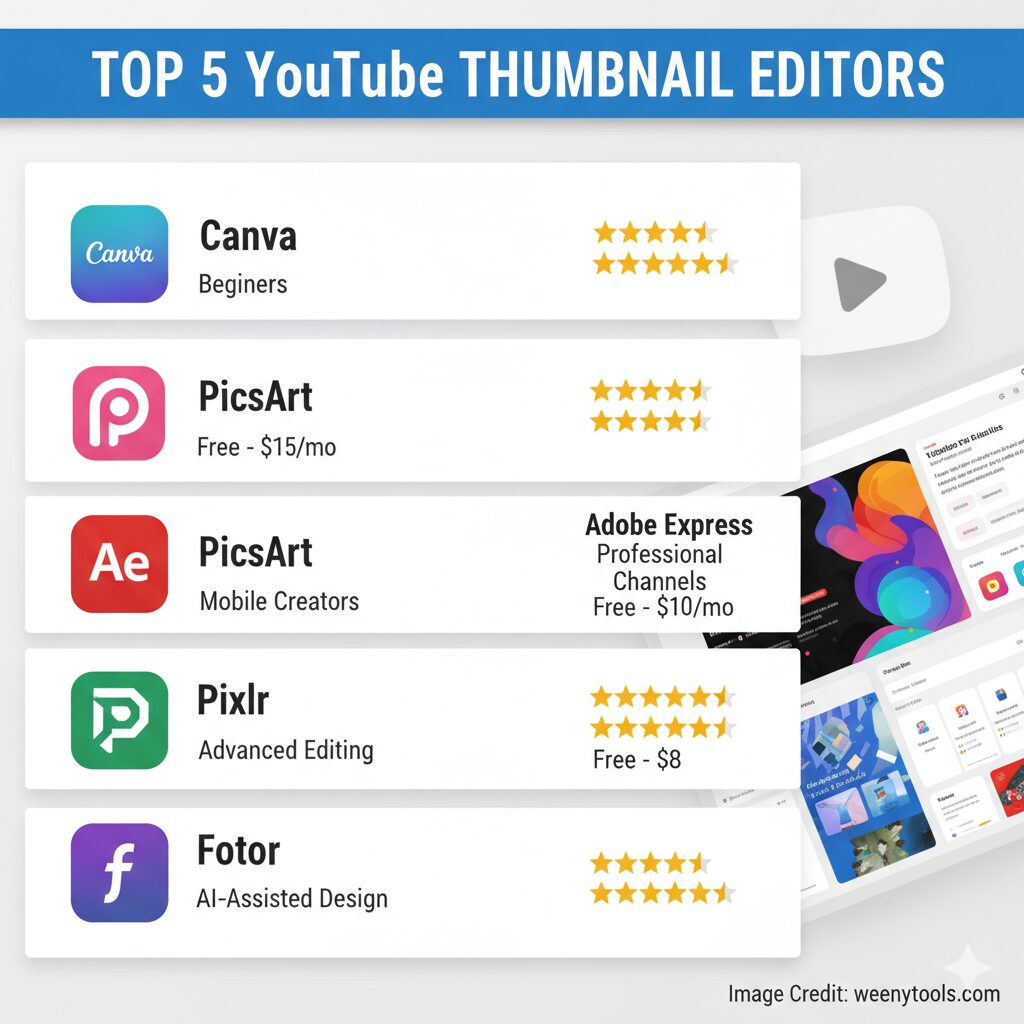
1. Canva – The Most Popular Thumbnail Maker
★★★★★ (4.8/5)
Pricing: Free / Pro $15 per month
Canva has become a top choice among YouTubers due to its incredibly easy drag-and-drop interface that makes designing a breeze. It offers over 250,000 templates, providing an extensive variety of options to suit any style or theme. Additionally, Canva includes built-in YouTube thumbnail sizes, ensuring your thumbnails are perfectly optimized for the platform. This tool is not only beginner-friendly, allowing newcomers to create stunning designs effortlessly, but it is also powerful enough to meet the needs of professional content creators who want more advanced customization and features.
✅ Pros
- Massive library of templates and elements
- Perfect YouTube size presets
- Cloud sync and team features
- Free plan with thousands of designs
❌ Cons
- Premium graphics require a paid plan
- Limited layer control
Best for: Beginners who want fast, professional results.
2. PicsArt – Mobile Editing Powerhouse
★★★★☆ (4.6/5)
Pricing: Free / Premium $12 per month
PicsArt provides creators with complete editing control right on their mobile devices. Featuring a wide range of powerful filters, versatile layers, and advanced AI tools, it offers an ideal solution for creating eye-catching thumbnails whenever and wherever inspiration strikes. This combination of features makes it especially convenient and effective for users who need to design thumbnails quickly while on the move.
✅ Pros
- Advanced photo tools on mobile
- AI background remover
- Creative effects and stickers
❌ Cons
- Free version has ads
- Smaller YouTube-specific template library
Best for: Creators who design thumbnails on phones or tablets.
3. Adobe Express – Professional Quality Simplified
★★★★☆ (4.4/5)
Pricing: Free / Premium $10 per month
Adobe Express, formerly known as Adobe Spark, offers a comprehensive suite of professional-grade design tools presented through an intuitive and easy-to-use web and app interface. This platform is especially ideal for creators who prioritize maintaining strong visual consistency across their projects and content.
✅ Pros
- Adobe-grade quality and assets
- Creative Cloud integration
- Advanced typography and branding tools
❌ Cons
- Requires Adobe login
- Limited templates in free tier
Best for: Professionals and brand-focused YouTubers.
4. Pixlr – Powerful Browser Editor
★★★★☆ (4.3/5)
Pricing: Free / Plus $8 per month
Pixlr provides Photoshop-like editing capabilities directly within your web browser, making it a highly convenient tool for users. It is especially perfect for creators who want to maintain manual control over their design process without the need to download or install any additional software on their devices. This browser-based platform delivers powerful editing features that cater to both beginners and advanced users alike.
✅ Pros
- Web-based, no installation needed
- Layer editing and filters
- AI-powered auto enhancement
❌ Cons
- Requires stable internet connection
- Interface can feel cluttered
Best for: Advanced users comfortable with image editing.
5. Fotor – AI-Assisted Thumbnail Creator
★★★★☆ (4.2/5)
Pricing: Free / Pro $9 per month
Fotor seamlessly combines advanced automation with extensive customization options, delivering AI-powered thumbnail creation that makes your design process faster and more efficient. It features one-click background removal, allowing users to instantly isolate subjects and enhance images effortlessly. Additionally, Fotor provides smart layout suggestions, intelligently recommending the best design arrangements to help you create visually appealing and professional thumbnails with ease.
✅ Pros
- AI design suggestions
- Batch thumbnail editing
- Simple user interface
❌ Cons
- Limited integrations
- Generic AI results sometimes
Best for: Creators who need quick thumbnail generation.
Quick Comparison Table
| Tool | Best For | Pricing | Ease of Use | Templates |
|---|---|---|---|---|
| Canva | Beginners | Free – $15/mo | ★★★★★ | ★★★★★ |
| PicsArt | Mobile Creators | Free – $12/mo | ★★★★☆ | ★★★☆☆ |
| Adobe Express | Professional Channels | Free – $10/mo | ★★★★☆ | ★★★★☆ |
| Pixlr | Advanced Editing | Free – $8/mo | ★★★☆☆ | ★★☆☆☆ |
| Fotor | AI-Assisted Design | Free – $9/mo | ★★★★☆ | ★★★☆☆ |
Which Tool Should You Choose?
Each app has strengths depending on your workflow. Here’s what we recommend:
- New YouTubers: Start with Canva for ease and templates.
- Mobile Creators: Use PicsArt for its advanced phone tools.
- Brand Builders: Choose Adobe Express for professional control.
- Speed-Focused Users: Try Fotor’s AI-assisted workflow.
Boost Your Workflow with Free Tools
Besides editing, you can also take advantage of our completely free YouTube Thumbnail Downloader, which allows you to quickly and easily extract thumbnails in HD, 4K, or standard quality from any video right away. To get more detailed information about all the tools we offer and how they work, be sure to visit our About and FAQ pages, where you will find comprehensive guides and helpful tips.
Conclusion
Choosing the right YouTube thumbnail editing app involves considering several important factors such as your current skill level, your preferred workflow, and the specific branding goals you aim to achieve. For the majority of content creators, Canva offers the best balance between ease of use and high-quality results, making it a popular and reliable choice. However, if you are looking for alternatives that better suit mobile editing or have more specialized brand-specific workflow needs, exploring options like PicsArt or Adobe Express can provide valuable features tailored to those preferences.
Need assistance or want to share your feedback with us? Please feel free to visit our dedicated Contact page where you can reach out directly. For detailed information regarding our policies and compliance standards, you can review our comprehensive Privacy Policy, our clearly outlined Terms and Conditions, as well as our important DMCA Policy.